
Who can submit to Claude's directory?
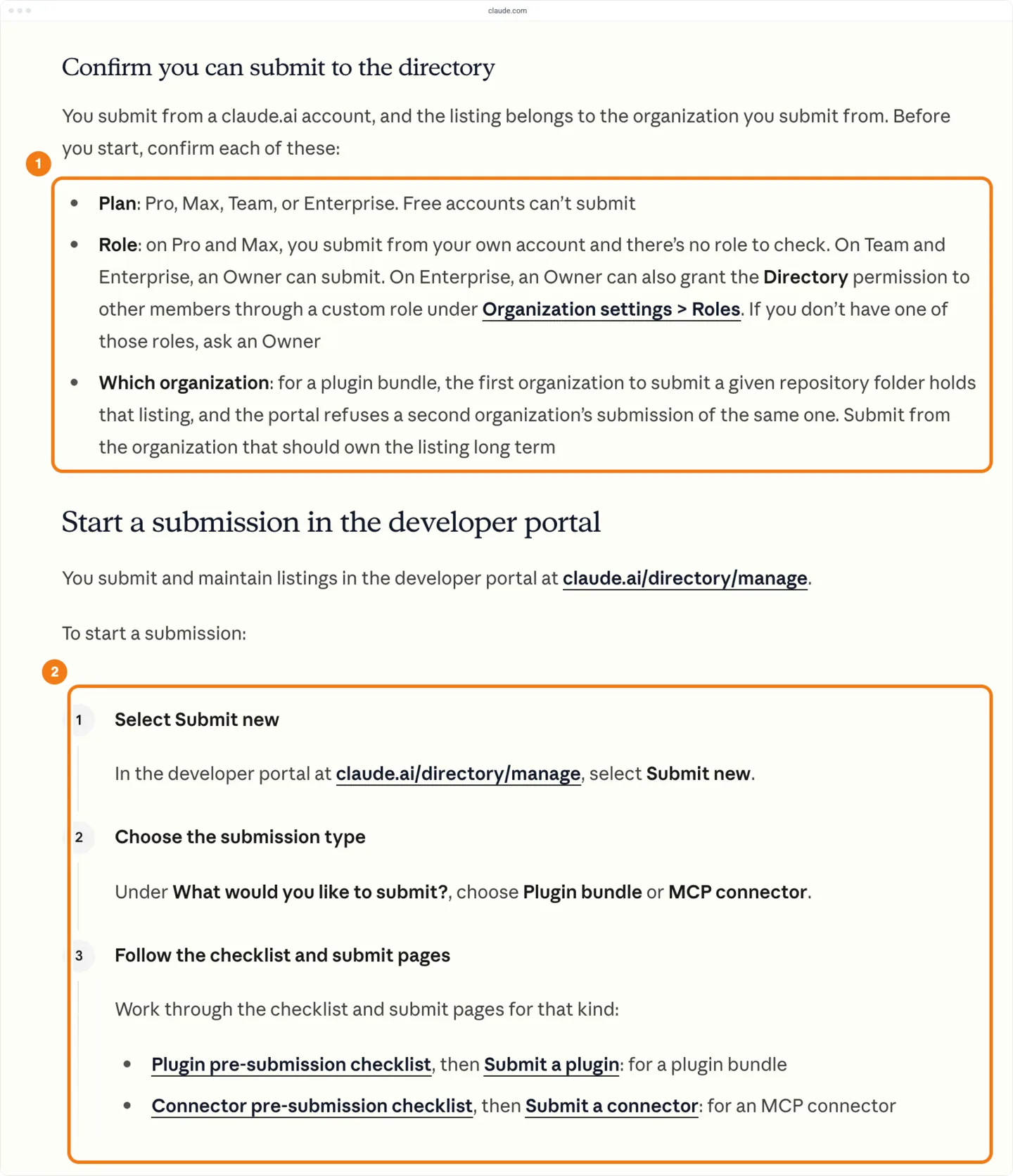
Anyone on a paid Claude plan can submit: Pro, Max, Team or Enterprise. Free accounts can't. On Pro and Max you submit from your own account. On Team and Enterprise an Owner submits, and an Enterprise Owner can give other members the Directory permission through a custom role (Anthropic's publish page).
The listing belongs to the organization you submit from. For a plugin, the first organization to submit a repository folder owns the listing, and no other organization can submit that folder. If another organization already holds your folder and you own the repository, email directory@anthropic.com (Anthropic's plugin submission page).
Anthropic's pages list no submission fee. The cheapest plan that can submit is Pro, at $20 a month billed monthly (Claude's pricing page).
Anthropic opened the developer portal to every paid plan on Sep 25, 2026 (Anthropic's announcement). Guides written before then say you need a Team or Enterprise organization, and that rule no longer applies.
Have these ready before the first step:
- For a plugin: a github.com repository you can push to, and your GitHub account connected on claude.ai in the organization you submit from (the portal offers Connect GitHub). For the push webhook you need admin access to the repository, and for
claude plugin validateyou need Claude Code. - For a connector: the server at an
https://URL, its listing links and icon, and a test account for reviewers. - Submission limit: an organization can create 10 submissions in any 24 hours, drafts and withdrawn submissions included.
If you still have to build the plugin, start with Anthropic's plugin structure and testing guide. How do I submit an app to ChatGPT, Claude, Cursor and Grok Bot? compares the stores.
Connector, plugin or both?
If you run a remote MCP server, submit it as a connector, even if a plugin already points at it. Put skills, commands, hooks and local servers in a plugin. If you have both, point the plugin at the connector's URL and pair the two in the portal, so people who install both see one set of tools (Anthropic's publish page).
A plugin bundle is a folder in a GitHub repository that can hold skills, commands, agents, hooks and MCP server references. A connector is one remote MCP server, submitted by its URL.
A local MCP server can't be a connector. The directory no longer accepts desktop extensions, so a local server goes inside a plugin (Anthropic's publish page). The newest desktop extension in our data launched on Aug 19, 2026.
Declare a local server in the plugin with command and args, not as a bundled .mcpb file, which gets a policy hold (plugin pre-submission checklist). The server runs in Claude Code, and in Cowork when the session runs on the user's computer. Chat ignores it (plugin feature support). What is the difference between connectors, plugins and skills? covers the rest.
| Plugin bundle | MCP connector | |
|---|---|---|
| Source | A folder in a GitHub repository, public before it goes live | The server's https:// URL |
| Automated checks | Validation and a security scan on every version | A policy scan on every submission |
| Human review | Every new listing | Some submissions get a person's review; Verified only if Anthropic escalates it |
| Label once listed | Community on 99% of plugins added Sep 28 to Oct 18 in our data (1,858 of 1,874) | Community by default; Verified (a checkmark, tools tested) after escalation |
| Updates | Merge to the tracked branch (raise version if you set it). Each new version is scanned; the listing serves the last published one | Deploy tool changes to your server; a reviewer approves each listing edit |
Can you submit a skill on its own?
A skill can't be submitted on its own; put it in a plugin, even a skills-only plugin. A folder with at least one skills/ and no plugin.json passes validation with a note, but it is listed for Claude Code only. Add plugin.json to list it everywhere else (plugin pre-submission checklist).
Before you open the portal
You can catch most problems before you open the portal. The lists below follow Anthropic's plugin pre-submission checklist and connector pre-submission checklist.
Anthropic refuses some uses for both kinds. The Software Directory Policy, which covers plugins, skills and MCP servers, refuses software that moves money, crypto or other financial assets without a person approving it, and software that generates images, video or audio with AI models. The policy allows design visuals such as slides, diagrams, charts and UI mockups. It also refuses advertising and adult content. The connector checklist refuses money transfers outright.
For a plugin
- Put
plugin.jsonin.claude-plugin/inside the plugin folder. Keep everything the plugin runs inside that folder, and point every path inplugin.jsoninside it. - Name the plugin after your own product, in lowercase letters, digits and hyphens, up to 64 characters. Validation blocks a name that is only a reserved word such as
claude, or one another organization already uses. A name made only of generic words, such astest-plugin, gets a policy hold, and so does a fork that keeps the upstream project's name. - Spell component folders, files and keys exactly as Claude Code expects, such as
hooks/,skills/,SKILL.mdandmcpServers, and keep component keys out of theexperimentalobject. - Make
.mcp.jsonandhooks/valid JSON that matches the schema in Claude Code's docs.hooks.json - Write valid YAML front matter in each skill, command and agent file, with
descriptionas plain text. - Add a README of at least 40 words, not counting code blocks, and a
LICENSEfile or alicensefield. - Delete
.DS_Store,Thumbs.db,desktop.iniand__MACOSXentries. Commit real files, not symbolic links, Git submodules or Git LFS pointers. - Use file names that work on both Windows and macOS: no colon, no trailing dot or space, no device name such as
con.md, and no two names that differ only in capitals. Name the folders on the plugin's path with letters, digits, dots, hyphens and underscores only. - Keep
export-ignore,export-substandfilterattributes, Git LFS included, out of your.gitattributesfiles. - Pin every package a launcher runs to an exact version, such as
npx <package>@1.2.3, and runuv runwith--lockedor--frozen. Unpinned packages block the submission; pinned ones still get a policy hold. - Leave out any
.npmrc,bunfig.tomloruv.tomlthat sets a package source. With a launcher it blocks the submission; with a package install it gets a policy hold. - Ask for every secret through a
userConfigentry inplugin.jsonwithsensitive: true, and refer to it as${user_config.KEY}. Keep real credentials out of every file, examples included. - Give each remote MCP server an
https://orwss://URL. If chat users need the server, keep${user_config.KEY}out of its URL: chat ignores a server whose URL contains one. Cowork ignores a server that refers to an option with no default. - Declare each local MCP server with a
commandandargsthat run a file in the plugin, such asnode ${CLAUDE_PLUGIN_ROOT}/. A shell,server.js -c,npm runor a.mcpbor.dxtbundle gets a policy hold, and a bundle fetched from a URL blocks the submission. - Leave out a top-level
bin/folder unless the plugin is for Claude Code only. Claude.ai and Cowork refuse to install a plugin that has one (plugin feature support). - Put what chat users need in skills, commands or a remote server. Chat ignores agents, hooks and local servers, and loads commands as skills. Cowork and Claude Code load agents, hooks and commands. The portal shows which surfaces the plugin supports before you submit.
- If the plugin folder is a subfolder of the repository, as in any marketplace repository, write each path in a hook or MCP server command in full from
${CLAUDE_PLUGIN_ROOT}, with no other variable, wildcard or inline program. - Describe in the README everything the plugin runs, sends or fetches. A first submission that fails the security scan is rejected.
- Commit readable source, not minified or packed code.
- Keep the repository under 50 MiB archived and 256 MiB unpacked, with fewer than 10,000 files and folders and each file under 5 MiB. Past those limits, validation stops.
- To avoid a policy hold, keep each file that isn't an image or font under 256 KiB, keep the plugin to 512 files or fewer, and leave out other binaries such as
.ico,.pdfand.zipfiles. - From the folder that holds the plugin folder, run
claude plugin validate ./, fix what it lists and run it again until it prints<plugin-folder> Validation passed. It checks syntax and schema only; the portal's Validate runs the directory's own rules. - Run
claude plugin evalto compare the plugin's output with Claude's output without it, and load the plugin on each surface your users use.
A bad file name, a folder on the plugin's path with other characters and a .gitattributes rule all give the same portal error, Couldn't validate that repository, with no findings. The error doesn't say which cause applies, so check all three.
Plugins added Sep 28 to Oct 18, the first 3 full weeks after the portal opened, are smaller than older ones. The median new plugin has 3 parts (skills, commands, agents, hooks or MCP servers), 1 of them a skill, against 5 and 2 for older plugins. A small plugin is a normal first submission: 59% of the new plugins have 3 parts or fewer, and 27% hold only skills.
| Plugin carries | Added Sep 28 to Oct 18 | Share | Share before Sep 28 |
|---|---|---|---|
| A skill | 1,619 | 86% | 85% |
| An MCP server | 976 | 52% | 39% |
| Skills only | 507 | 27% | 27% |
| A command | 265 | 14% | 22% |
| A hook | 189 | 10% | 22% |
| An agent | 129 | 7% | 20% |
For a connector
- Host the server at an
https://URL. A local server can't be a connector. - Choose how users sign in: OAuth 2.0 if the tools act on a user's account, or no sign-in for public data. API keys in request headers are a beta for a limited set of organizations, and a machine-to-machine
client_credentialsgrant isn't supported.
If you use OAuth, check each of these against Anthropic's authentication page:
- Let Claude register itself. Expose a
registration_endpointfor Dynamic Client Registration (DCR), or support a Client ID Metadata Document (CIMD). For CIMD, advertiseclient_id_metadata_document_supported: trueandnoneintoken_endpoint_auth_methods_supported, or Claude falls back to DCR. For heavy directory traffic, Anthropic recommends CIMD or an Anthropic-held client over DCR. - If you can't support either, create a confidential client and enter it in the portal's Authentication step. Claude Code doesn't use that client, so support CIMD or DCR too if Claude Code users should be able to sign in.
- Register
https://as a redirect URI, and accept Claude Code's loopback redirect on any port, for bothclaude.ai/ api/ mcp/ auth_callback localhostand127.0.0.1. - Answer an unauthenticated call with
401and aWWW-Authenticateheader whoseresource_metadatapoints at your protected resource metadata. - Support S256 PKCE in your authorization server and list
S256in itscode_challenge_methods_supported. - Set
resourcein your protected resource metadata to the server URL exactly as users enter it, path included, and put your own issuer first inauthorization_servers, because Claude uses only the first entry. - Accept
application/bodies atx-www-form-urlencoded /, and answer a renewal with an expired or revoked token withtoken invalid_grant. - Keep your OAuth discovery, registration and token endpoints answering within 10 seconds. Let Anthropic's traffic from
160.79.104.0/through any firewall, CDN or WAF, in front of your identity provider as well as your MCP server.21
Then check the tools and what you submit with them:
- Give every tool its tool annotations: a title, and readOnlyHint set to
trueon tools that only read or destructiveHint set totrueon tools that change or delete data, as in{"name": "list_orders", "title": "List orders", "annotations": {"readOnlyHint": true}}. Keep tool names to 64 characters or fewer. - Split any tool that both reads and writes into separate read and write tools. A catch-all tool with a
methodparameter is rejected. - Write each tool description to say what the tool does, and name or link the target API in any tool that takes free-form paths or queries. A description is rejected if it tells Claude how to behave, pushes Claude to call tools the user didn't ask for, gets in the way of other tools, promotes products or hides instructions.
- Make every tool succeed with valid input and return errors that say what to fix, not a bare
Internal Server Error. - Collect only the conversation data a tool needs, and never read Claude's memory, chat history, conversation summaries or user files.
- Keep each response sized to the request; a full database dump in place of a summary fails review.
- Call only your own API, or a partner's API you have permission to pass calls to, from an MCP server on your own service's domain.
- Add the server to Claude as a custom connector and run each tool from a conversation. When sign-in works, the connector shows Connected under Your connectors.
- If your server supports neither CIMD nor DCR, choose Use your own OAuth client in the custom connector dialog and enter your client ID, plus the secret if your server requires one. A custom connector never uses the secret you enter in the portal.
- Collect a documentation URL, a privacy policy URL, a support contact and an icon. The documentation can be a blog post or help article, and it is due by your publish date, not when you submit.
- For an MCP App, make 3 to 5 PNG carousel screenshots at least 1,000 px wide, cropped to the app's response with no prompt in the image, and write each one's prompt separately. The portal doesn't take video or GIFs.
- If the connector opens links, list the HTTPS origins and URI schemes you own as allowed link URIs. Reviewers remove entries you don't own.
- Set up a fully populated test account for reviewers.
Plan sign-in and the reviewer account early. Of the 746 servers behind the Claude connectors in our data with a known status, 590 (79%) ask for sign-in before they list any tool, and 521 of those use OAuth. A reviewer can test an auth-gated server only with the account you give.
| Access | Servers | Share |
|---|---|---|
| Needs sign-in | 590 | 79% |
| Open | 104 | 14% |
| Restricted | 42 | 6% |
| Error | 9 | 1% |
| Offline | 1 | 0.1% |
Of the 104 connector servers in our data that list their tools without sign-in, 86 (83%) give every tool a title and a hint, and none has a tool name over 64 characters. Titles are the usual gap: 16 of the 104 have a tool without one, so check titles first. Most of these servers were listed before the portal opened, so they show what listed servers look like, not what review enforces. What MCP tool design teaches has the wider numbers.
How do you submit a plugin?
In the developer portal, select Submit new, choose Plugin bundle, point it at the repository folder and select Validate. Then fill in Listing details, Data handling and Compliance, submit, and select Publish once the status reads Approved. Each plugin folder is its own submission, so a repository with several plugins needs one per folder (Anthropic's plugin submission page).
- Open the developer portal at claude.ai/directory/manage.
- Select Submit new.
- Under What would you like to submit?, choose Plugin bundle.
- On Source, enter the repository URL or
owner/, the plugin path if it isn't the root, and a branch or tag if it isn't the default branch.repo - Select Validate. Fix every finding the report marks Blocking, push the fix, and select Re-validate. A result covers one commit.
- On Listing details, check the listing the portal reads from
plugin.jsonand the README. Edit those files to change it. - On Data handling, answer the questions on personal data, other services, retention and users under 18.
- On Compliance, check the contact email and select all 4 acknowledgements.
- On Review and submit, keep GitHub push webhook or choose Scheduled check only, and set Auto-publish passing versions if you want it. Auto-publish matters only once the Auto-publish row on the plugin's Overview tab says versions can go live without a reviewer.
- Select Submit for review. The portal shows Plugin submitted for review, with Set up push updates if you kept the webhook.
- If the repository is private, make it public on GitHub, then select Check for new commits on the plugin's page.
- When the status reads Approved, select Publish on the plugin's page. By default this sends a request, and a reviewer publishes the version. The status then reads Published.
A private repository can go through these steps with the Claude GitHub App installed and your consent to the source upload. Until it is public, the plugin's page shows Publishing needs a public repository.
Validation gives each finding one of 4 results. Blocking stops the submission. Policy hold lets you submit, and a reviewer reads that version before it goes live; a hold isn't a rejection. Warning and Note need no fix.
How do you submit a connector?
The portal takes a connector through 10 pages, and Anthropic's connector submission page lists what each asks for. Finish in one browser session, because the portal saves your progress only in that browser.
- Open the developer portal at claude.ai/directory/manage and select Submit new.
- Choose MCP connector.
- On Connection, paste the server's
https://URL, or pick a custom connector you already added. If customers connect to different URLs, select Users connect to different URLs and choose Multiple URLs or URL pattern. - On Tools, check the tools that sync from the server, and fix any flagged ones on the server.
- On Listing, enter a name up to 100 characters, a one-liner up to 200, a description up to 2,000, 1 to 5 categories, the documentation, privacy policy and support links, the icon, and the URL slug, which can't change once published.
- On Use cases, describe the main uses, what a user needs first, and whether the connector reads data, writes it or both.
- On Company, enter the company name, website and a primary contact for review updates.
- On Authentication, choose whether users sign in and how. Choose Required when the server asks if some tools work without sign-in. To have Anthropic hold your OAuth client, enter its client ID and secret here, and enter the secret again if you reload the page before you submit.
- On Data handling, say whether the API is your own, a partner's you call with permission, or a third party's you don't control, and whether the connector handles health data or sponsored content.
- On Test & launch, give the reviewer test account and every step to reach your tools, and confirm that you ran each tool.
- On Compliance, select all 7 acknowledgements.
- On Review and submit, read any quality warnings, which go to the review team, then submit.
By default, Anthropic scans the submission and lists it as a Community connector with no action from you. If a person reviews it, the status moves through In review to Approved. Then select Publish, and the status changes to Published. Editing the listing before you publish sends it back to draft for another review (Track your directory submission).
A listing with Multiple URLs or a URL pattern can be published only after it earns the Verified label. You can't apply for Verified, and these reviews take longer. A URL pattern also rules out Anthropic-held OAuth credentials, and Multiple URLs rules out a custom connection (Anthropic's connector submission page).
Anthropic can't edit the detail card description you write in the portal, so get it right before you submit. How to write a Claude connector or plugin listing people find covers the text.
Give a privacy policy URL in the Listing step; every connector in our data shows one. Anthropic's connector page says a missing privacy policy means immediate rejection, though it says so under its rules for local connectors.
What happens after you submit?
After you submit, the developer portal shows one status for each submission, and only Published means people can install the plugin or connector (Track your directory submission).
Approved doesn't mean live. When a plugin version passes, select Publish; by default that sends a request, and a reviewer publishes the version. A connector that a person reviewed goes live as soon as you select Publish.
| Status | Plugin bundle | MCP connector |
|---|---|---|
| Draft | Not sent; select Continue submission | Not sent; you continue it |
| In review | A reviewer checks it | A reviewer checks it, for submissions a person reviews |
| Not approved | A rejected plugin shows Resubmit for review and Appeal this decision | Read the notes under View feedback, edit the listing and resubmit |
| Approved | Passed, not live; the card says who publishes | Cleared by a reviewer, not live; select Publish |
| Published | Live | Live |
A plugin can also show Scanning (the security scan is running), Needs changes (push a fix, then select Check for new commits), Not live yet (Anthropic still has to list it), Delisted (select Relist plugin to ask for it back) and Withdrawn. A connector can also show Changes requested: read the note under View feedback, then resubmit.
A connector is listed with the Community label by default. Anthropic has screened a Community connector but not reviewed it in depth, and Claude shows a reminder before someone connects it. A Verified connector shows a checkmark, and Anthropic has tested its tools. Anthropic may escalate a listing to Verified review on its own; there is no application (connector verification).
What gets a submission held or rejected?
| Outcome | Plugin bundle | MCP connector |
|---|---|---|
| Can't submit | A Blocking validation finding, such as an unpinned launcher, a short README or a taken name | We have not found this documented; fix any tools the Tools page flags |
| Policy hold | A registry package (even pinned), a lockfile install, a file over 256 KiB, more than 512 files, a binary, a server started through a shell or npm run, or code the scan can't read | Not a connector result; some submissions get a person's review |
| Rejected | A failed security scan on a plugin never published, or a reviewer's decision | A reviewer's Not approved, for the reasons in the connector list above |
| Not accepted | What the Software Directory Policy refuses: money transfers without a person approving them, AI image, video or audio generation, advertising, adult content | The same policy; the connector checklist also refuses money transfers outright |
How long does review take?
Anthropic's pages give no fixed review time, and say that connector reviews by a person vary with queue volume (Anthropic's connector submission page). Before the portal opened, Petr Kushnir wrote on dev.to that his Trip Logistics connector took 20 days, from submission on Jul 10, 2026 to approval as Community on Jul 30. That is one case, from before Sep 25.
Announce a connector only once its status reads Published and the listing shows in the directory people browse inside Claude. In our data, a connector's listing can go up weeks after the launch date Claude shows for it.
If a plugin seems stuck, use Get help or Contact Anthropic in its portal menu, or email directory@anthropic.com; a rejected plugin also shows Appeal this decision. For a connector, email mcp-review@anthropic.com.
How do you update a listed plugin or connector?
To update a plugin (Anthropic's plugin submission page):
- Merge the change to the tracked branch, and raise
versioninplugin.jsonif you set it. - Select Check for new commits on the plugin's page, or let the push webhook or the scheduled check find the commit.
- When the new version passes, publish it as you did the first. The Auto-publish row on the plugin's Overview tab says whether later versions go live by themselves.
Until a new plugin version is published, the listing serves the last one. If the security scan fails a new version, later versions wait until a reviewer clears the plugin.
To update a connector (after publishing):
- Deploy the tool changes to your server.
- Edit the listed tool names, and any other listing details, on the listing's page in the portal.
- Submit the edit for review. The live listing stays as it was until a reviewer approves the edit (Manage your directory listing).
What should you do once the listing is live?
- Link the connector's permanent listing URL,
claude.ai/, from your own docs or from a Connect to Claude button (after publishing).directory/ connectors/ <slug> - Read a plugin's Usage tab. Its directory funnel counts listing views, install clicks and installs, and Anthropic's announcement says you also see which searches lead people to the listing.
- If a reviewer edited a plugin's name or short description during review, the listing keeps the reviewer's text (after publishing).
How to write a Claude connector or plugin listing people find covers the name and description a listing shows.
Submitted through the Claude Console form?
The Console form is no longer supported. Until you move an old submission, the portal can refuse the same repository and folder with Already submitted by another organization.
- Open Plugin submissions in the Claude Console.
- If the submission has a Withdraw button, select it, then submit again in the portal.
- If it has none, delete any portal draft for the same folder, then email
directory@anthropic.comto have it moved.
Did the portal change how fast listings arrive?
Plugins started arriving far faster in the week after Claude's developer portal opened on Sep 25, 2026. In the 8 weeks to Sep 20, the directory added a median 34.5 plugins a week; in the week of Sep 28 it added 887, then 626 and 361. The timing lines up with the portal; the data doesn't show why.
Plugins
Connectors
| Week of | Plugins | Connectors | Desktop extensions | All |
|---|---|---|---|---|
| Jul 27 | 30 | 31 | 1 | 62 |
| Aug 3 | 33 | 32 | 1 | 66 |
| Aug 10 | 33 | 27 | 9 | 69 |
| Aug 17 | 25 | 33 | 2 | 60 |
| Aug 24 | 53 | 16 | 0 | 69 |
| Aug 31 | 46 | 29 | 0 | 75 |
| Sep 7 | 36 | 25 | 0 | 61 |
| Sep 14 | 45 | 17 | 0 | 62 |
| Sep 21 | 33 | 13 | 0 | 46 |
| Sep 28 | 887 | 10 | 0 | 897 |
| Oct 5 | 626 | 11 | 0 | 637 |
| Oct 12 | 361 | 5 | 0 | 366 |
| Oct 19 partial, to Oct 25 | 6 | 5 | 0 | 11 |
In our data, plugins were 57% of new listings in the 8 weeks to Sep 20 and 99% (1,874 of 1,900) in the 3 weeks to Oct 18. That share leaves out Community connectors, which our data doesn't hold, and connector weeks since Sep 28 are not yet complete, so the real plugin share may be lower.
Recent connector weeks are likely to grow. Of the listings that went up in the 2 weeks to Oct 25, every plugin went up within 0.4 days of its launch date. In our data, which holds no Community connectors, the 72 connectors went up a median 42.6 days after the date Claude shows. So don't read the 10, 11 and 5 connectors in the weeks since Sep 28 as a slowdown.
Plugins go live in batches. On Oct 5, 212 plugins launched in the same hour. Since Oct 7, most days have added fewer than 20 plugins, and 4 days added many more: 114 on Oct 13, 101 on Oct 15, 45 on Oct 16 and 97 on Oct 18. In the week of Oct 19, 6 plugins launched through Oct 25. A quiet week after you submit is not a rejection; check your status in the portal.
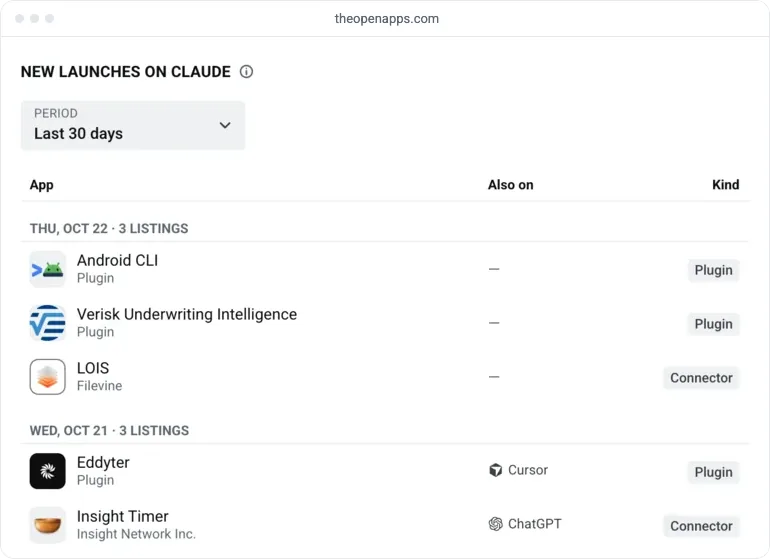
Plugins added Sep 28 to Oct 18 rank lower than older ones. Of them, 75% have a place in Most popular, but only 9 are among the top 100 plugins on Claude's Most popular chart, against 91 older plugins.
What our data can't tell you
- Review time and outcomes. We see listings, not submissions, so we can't time a review or count rejections and held versions. Leave room before any launch date you announce.
- Community connectors. Anthropic's pages say connectors are listed as Community by default, yet no connector in our data carries the Community label. Petr Kushnir's Trip Logistics connector, approved as Community on Jul 30, 2026, isn't in our data either. Our connector numbers may leave out Community listings, and a Community connector you submit may not appear in OpenApps data.
- Earlier weeks. The counts for each week include only listings that were still in the directory later on. A listing removed soon after launch isn't counted, so the older weeks may be low.
- Why plugins arrive in batches. Anthropic's pages don't say, and our data shows when, not why.
Follow your status in the portal. Once a plugin's status reads Published, look for it on new launches for Claude. For a connector, open its permanent listing URL in the directory, or find it under Customize > Connectors in Claude.