
Every number here describes the public Cursor Marketplace on Oct 25, 2026. cursor.directory is a separate community site with its own plugins, rules and MCP servers, and none of its numbers appear here. "Outside publishers" means every publisher except Cursor. Cursor writes its own listings in a house style, and they would skew every median. A plugin's store date is the launch date the marketplace gives it. How to publish a Cursor plugin to the marketplace covers getting listed in the first place. For the other stores, see How to write a ChatGPT app listing people find and How to write a Claude connector or plugin listing people find, and for submitting the same server to each store, How to submit an app to ChatGPT, Claude, Cursor and Grok Bot.
Which plugin.json fields reach the listing?
Four things in your repo become the listing people read: the display name, the description, the logo, and the name and description of each component you bundle. Everything below assumes a Cursor Plugin, whose manifest sits at .cursor-plugin/. The Agent Plugins format keeps its plugin.json in the plugin's root folder, and its manifest has no displayName, logo or category field. If you want to set the listed name and logo, use the Cursor Plugin format. How to publish a Cursor plugin to the marketplace compares the two formats.
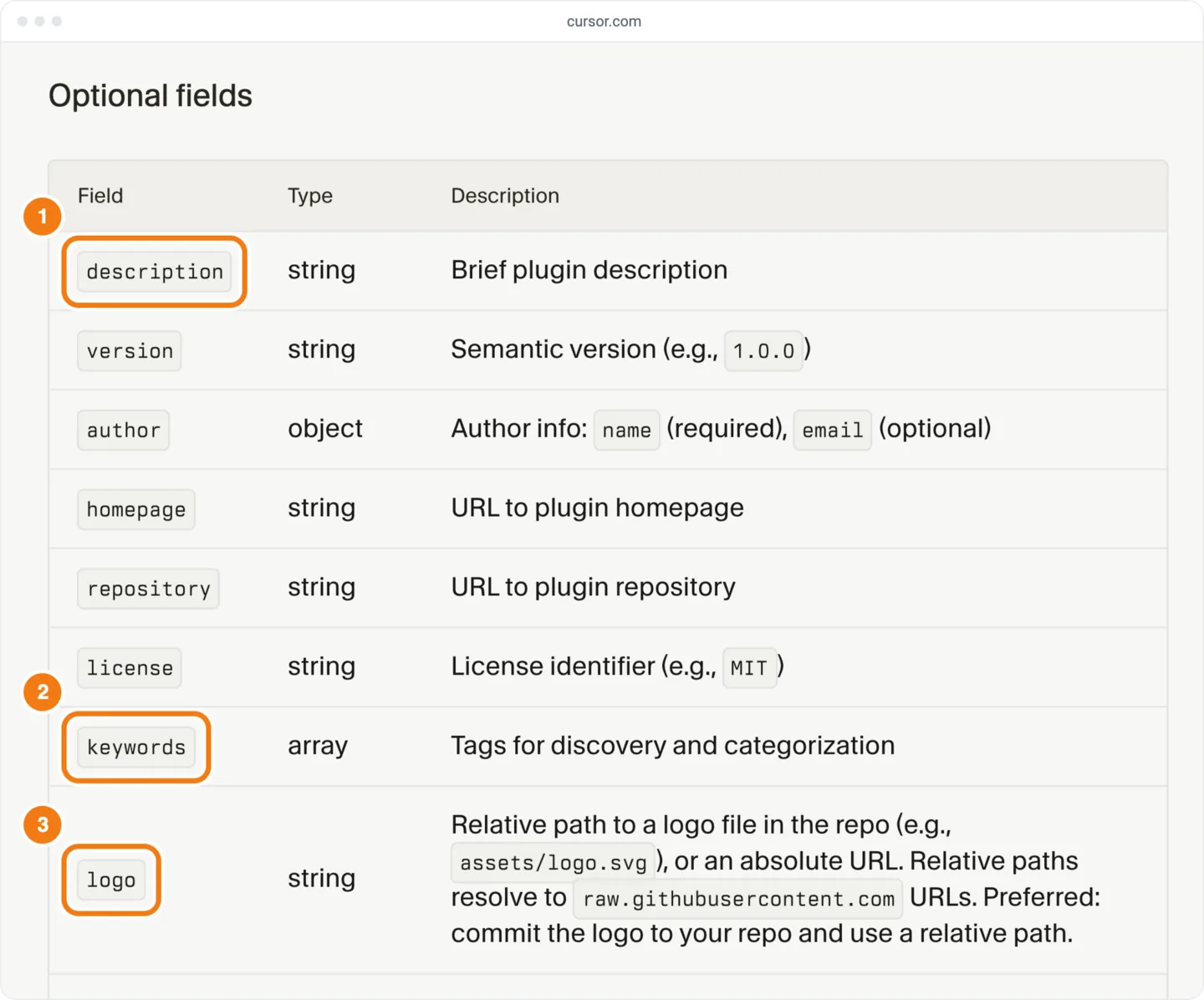
The plugin reference documents name, description, keywords and logo. It doesn't document displayName, and it documents category and tags only for marketplace.json entries. Cursor's JSON schema has displayName, category and tags for plugin.json too, and its plugin template uses displayName. The schema rejects any field it doesn't list, and its author takes only name and email. A typo such as display_name, or an extra such as author.url, fails validation against it.
In a repo with several plugins, write listing copy in each plugin's own plugin.json. Such a repo also has a .cursor-plugin/ (Cursor's template has one), and its entries take a description, logo, keywords, category and tags too. The plugin reference says plugin.json wins where both set a field.
The marketplace page groups plugins into curated sections, such as Featured, Productivity and Payments, and puts the rest in a catch-all section called "Plugins". The category in plugin.json doesn't decide the section.
| Field | Documented in | Where it shows | What the listings show |
|---|---|---|---|
name | Docs (the only required field) and schema | The / command on the plugin page | Lowercase kebab-case: letters, digits, hyphens and periods. With no displayName, the listing shows the brand, capitalized; in 91 of 127 such manifests the listed name is name with spaces for hyphens |
displayName | Schema and template only | Card and plugin page title | 41 of 221 listed under a different name (19%) |
description | Docs and schema | One line on the card; in full on the plugin page and in its meta description | 52 of 347 listed differently (15%); 4 of those list none |
logo | Docs and schema | Card and plugin page icon | 255 of 271 manifest logos appear on the listing (94%) |
keywords | Docs and schema | Not on the web listing, which carries no keywords; we couldn't test Customize search | Set in 94% of outside publishers' manifests |
tags | Schema; docs only for marketplace.json | Not as written: the listing carries its own tags, usually one brand word | Upstash's manifest sets 6 tags; its listing carries 1, upstash |
category | Schema; docs only for marketplace.json | Not directly: the listing's curated section doesn't follow it | 48% of plugins that set it are in a curated section, against 60% that don't |
author, publisher | Docs (author) and schema | Not directly: "Created by" names the listing's publisher, and "Verified by Cursor" shows for some publishers | author.name matches "Created by" in 272 of 344 manifests that set it; 20 set publisher |
MCP server key in mcp.json | Docs | The plugin page's MCP list, and plugin-<name>-<key> in approval prompts | 356 of 372 outside keys contain the brand name |
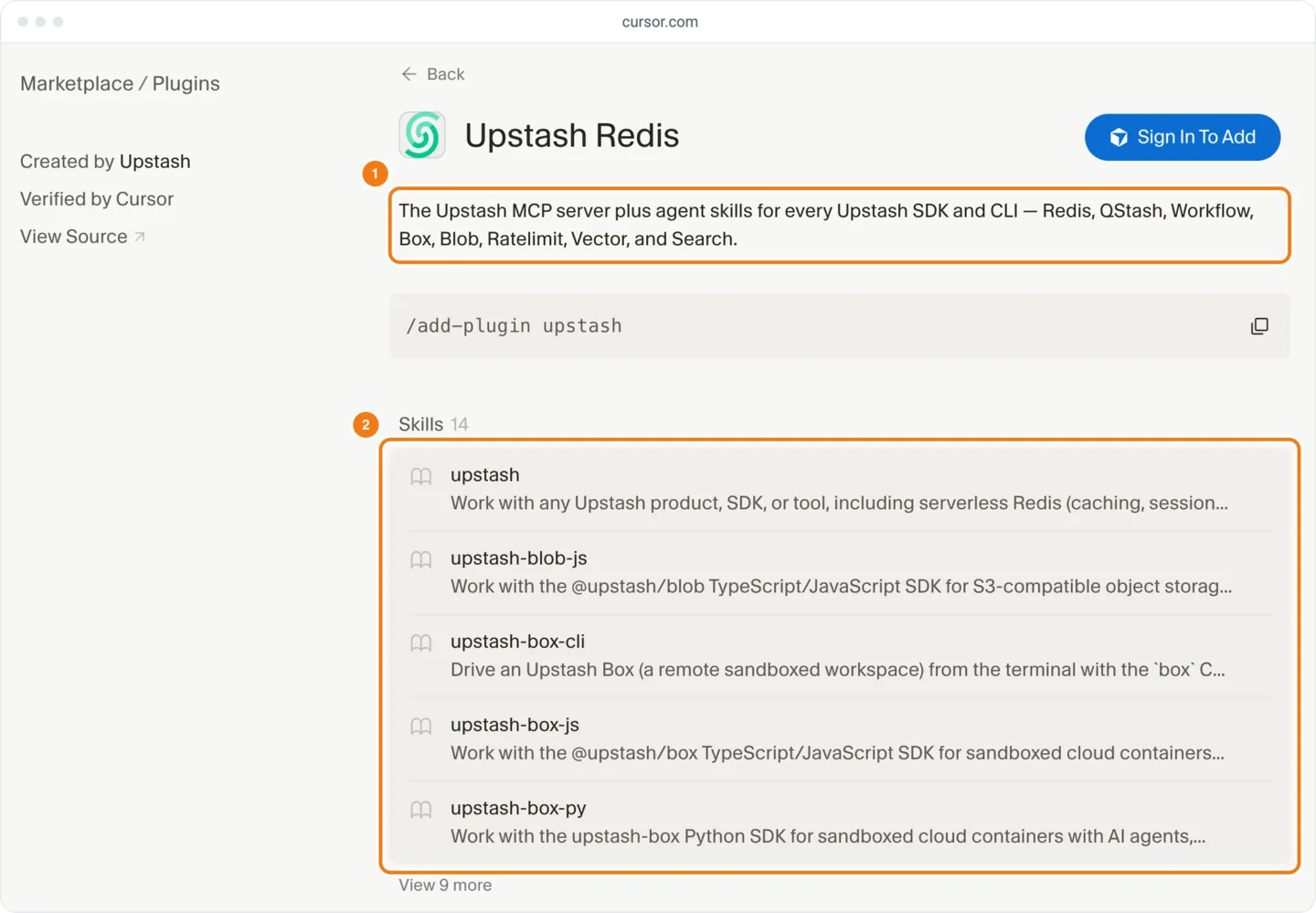
Component name and description | Skill, command and agent frontmatter (skills docs) | The plugin page's first 5 of each kind, each a name above one line of its description | 56% of skill descriptions are 280 characters or more |
| README.md | Docs submission checklist | Not shown; the page links the repo with "View Source" | n/a |
The README is not part of the listing. Cursor's submission checklist asks for a README that documents usage and configuration, but the marketplace shows none of its text. Write it for reviewers and for the person who clicks "View Source", not as listing copy.
What does a marketplace card show?
Someone browsing the Cursor Marketplace first sees a card: the name, the logo and one line of description that ends in an ellipsis. At a 1,440-pixel window, 106 of the 114 visible cards on the marketplace page cut the description, and the visible part ran 41 to 46 characters, a median of 44. A narrower window shows less. Only 3% of outside publishers' descriptions fit in 44 characters, against 7% of Cursor's own.
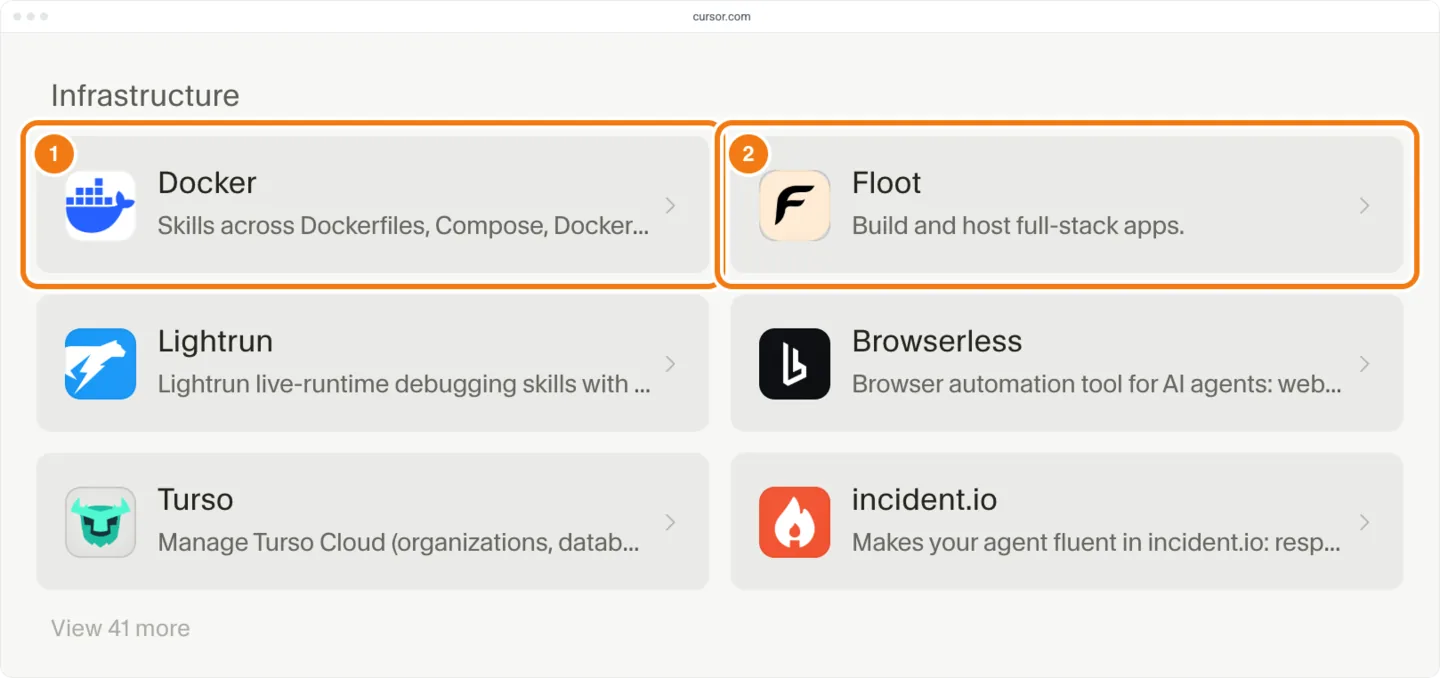
The plugin page adds the rest: the full description, the "Created by" publisher, a "Verified by Cursor" line for some publishers, a "View Source" link, the / command and related plugins. It also lists what the plugin bundles, kind by kind: skills, rules, commands, subagents, hooks and MCP servers. We have not found a Cursor page that says who gets the verified line.
The same words reach Grok Bot. Every Grok Bot plugin carries its Cursor listing's name and description unchanged, so there is nothing separate to write, and a line that says "in Cursor" reads oddly there. To keep a plugin out of Grok Bot, set minClientVersions.grokbot to "never" in plugin.json (Cursor's schema). How to get a plugin into Grok Bot covers that route.
How long should a Cursor plugin description be?
A Cursor plugin description should do its job in the first 44 characters and stay under about 155 in all, a common snippet length rather than a documented limit. Cursor's docs and schema set no length limit. The plugin page uses the whole description as its meta description, the text a search result can show under the page title "<Name> | Cursor Plugins". Search results cut long snippets. 122 of the 363 outside descriptions (34%) run past 155 characters.
Cursor writes its own listings short: a median of 57 characters, and 79% under 100. Outside publishers write longer: a median of 126 characters, with 31% under 100 and 19% at 200 or more.
| Characters | Outside publishers | Cursor |
|---|---|---|
| None | 7 | 0 |
| Under 60 | 30 | 58 |
| 60 to 99 | 82 | 26 |
| 100 to 149 | 118 | 6 |
| 150 to 199 | 65 | 10 |
| 200 to 299 | 45 | 5 |
| 300 or more | 23 | 2 |
A card shows only the opening words, so they carry the listing. Cursor starts 87% of its own descriptions with a verb, most often "Search" (28 of 107). Among outside publishers, 57% of descriptions with a store date since Aug 24 start with a verb, against 42% of older ones (49% overall). Their most common first word is "Connect" or "Connects" (10%), which says what the plugin links to, not what it does. The plugin's own name opens 17% of them, though the card already prints it above the line.
| How the description opens | Outside publishers (363) | Cursor (107) |
|---|---|---|
| Starts with a verb | 49% | 87% |
| Starts with "Connect" or "Connects" | 10% | 0% |
| Starts with the plugin's own name | 17% | 0% |
| Opens with its own name, or has "Cursor", "MCP" or "plugin" in its first 44 characters | 35% | 2% |
| Fits on a card (44 characters or fewer) | 3% | 7% |
When does a listing differ from its plugin.json?
A listed Cursor plugin shows the text from one reviewed commit, so a later push to plugin.json changes nothing until Cursor reviews and re-indexes it (marketplace security page). Even at the listed commit, 52 of 347 outside plugins (15%) list a different description, and we can't see who makes that change.
The changed descriptions follow a pattern. Of the 52, 4 listings show no description at all. Of the other 48, 44 are shorter, and the median change is 48 characters cut; 22 lost "MCP", 19 lost "Cursor" and 11 lost an em dash. Display names follow the same pattern: 41 of 221 differ, 37 are shorter, and 25 drop a word such as MCP, Skills, Plugin, Server or Cursor.
| Plugin | plugin.json | Listed |
|---|---|---|
| Writer | Name "Writer MCP" | "Writer" |
| Sonatype | Name "Sonatype Cursor Plugin" | "Sonatype" |
| Ryze AI | Name "Ryze AI: Google Ads, Meta Ads, SEO" | "Ryze AI" |
| PubNub | "... with PubNub MCP and PubNub Skills directly inside Cursor." | "Build production-ready realtime apps with PubNub." |
| Alpaca Broker API | "Connects Cursor to Alpaca's Broker API over OAuth-protected MCP." | "Connect to Alpaca's Broker API." |
| Bitrise | "Set up and manage mobile CI/CD on Bitrise from Cursor: ..." | The same, without "from Cursor" |
| fal | 500 characters: a one-line pitch, then a list of model names | "... from a prompt." (56 characters) |
Listed copy can also change after launch. 9 plugins had a listing change to their description from Oct 9 to Oct 25, and 3 to their display name (each plugin's page lists its changes). Some kept the same listed commit: Natural's description dropped "- via Natural's hosted OAuth MCP", and Airwallex AgentOS became Airwallex.
Write plugin.json the way the edited listings read, and there is less for anyone to change. These rewrites follow the cases above, with <Brand> standing in for your product. Cursor's publisher terms add two rules for listing copy: descriptions must be accurate and make no unsupported claims, and the editor is "Cursor", never "Cursor AI" or "Cursor Code".
| Pattern | Before | After |
|---|---|---|
| Name with a label | <Brand> MCP Server | <Brand> |
| Store and protocol first | Official <Brand> plugin for Cursor, via MCP. | Search and update <Brand> records from chat. |
| Says what it connects to, not what it does | Connects Cursor to <Brand>'s API over MCP. | Create, track and export <Brand> invoices. |
| An inventory | A paragraph listing every model or endpoint | Create images and video from a prompt. |
To get rewritten copy onto a listed plugin, ship it as an update: How do you update a live plugin? lists the steps. In the re-index email, say the change is listing copy. When the review passes, the plugin page shows the reviewed commit's text, possibly edited.
What name will the listing show?
The listing shows a brand name, almost always bare. No outside publisher's listing name contains "MCP", "plugin" or "Cursor". 76% are one word, 80% are the publisher's own name, and the longest is 30 characters. When a manifest has no displayName, the listing still shows the brand, capitalized: digitalocean lists as DigitalOcean and docker-skills as Docker.
Set displayName to the brand alone and you match what the listing will show. Make the kebab-case name the brand too, if no listed plugin has it. Cursor's submission checklist asks for a unique name, and name is the handle in / that users type. Pick it before you submit. The handle comes from name, so a rename would likely change the install command; we have not found this documented.
The "Created by" line names the publisher. The schema has a publisher field, but only 20 of 347 outside publishers' manifests set it. author.name matches "Created by" in 272 of the 344 that set it (79%), so the data doesn't tie that line to either field.
A company that submits through the form may still be filed as an individual. On Apr 2, 2026, Cursor staff said the submission form had no company option, and suggested that a company put its name in author.name and add a note "in the description when you submit" saying it is a company (thread on submitting as a company). We have not seen the signed-in form, so we can't say whether that means a field on the form or the description in plugin.json. Either way, keep the note out of plugin.json: its description is your card line, your plugin page's meta description and your Grok Bot listing. Put the note in the form's own fields, or email it to marketplace-publishing@cursor.com with the plugin name and the repo. How do you publish a Cursor plugin, step by step? lists what builders report the form asks for.
How do people find a Cursor plugin?
On the web marketplace, people browse its sections or type in its search box. On Oct 25, the search found plugins by a word in the name, a skill name or a skill description, and found nothing for a word that appears only in plugin.json keywords. 94% of outside publishers' manifests set keywords, which the reference calls "Tags for discovery and categorization". Cursor's plugin docs add a keyword search in Customize inside the editor, which we didn't test.
| Search term | Where the word appears | Result |
|---|---|---|
campfire | Only in Basecamp's plugin.json keywords | No results |
basecamp | Basecamp's name | Basecamp |
shader | Only in Figma's skill descriptions | Figma |
figma-generate-diagram | A Figma skill's name | Figma |
A plugin's curated section doesn't follow the category in its plugin.json: 48% of outside plugins whose manifest sets one are in a curated section, against 60% of those that don't. A section can also arrive after launch: Deriv has a store date of Oct 7 and gained Payments on Oct 12. On Oct 23, MailerLite, Klaviyo and Brevo moved to Cursor's Marketing category, which has no section on the page, so they now show under the catch-all "Plugins".
Each section of the marketplace page shows only its 6 newest plugins before a "View N more" button, so the section decides how long a new plugin stays in view. 57% of plugins with a store date since Aug 24 sit in the catch-all "Plugins" section, where new plugins arrive fastest.
| Section | Pushed out | Still in first 6 | Median days | Range |
|---|---|---|---|---|
| Plugins (catch-all) | 127 | 0 | 2.6 | 0 to 6.2 |
| Productivity | 18 | 6 | 15.4 | 0 to 28.8 |
| Inbox and Collaboration | 8 | 6 | 25.4 | 9.8 to 41.5 |
| Design | 5 | 4 | 28.5 | 21.9 to 42.9 |
| Data & Analytics | 5 | 6 | 33.4 | 28.3 to 46.4 |
| Payments | 7 | 5 | 34.1 | 19.6 to 41.4 |
| Sales | 3 | 5 | 37.1 | 33.6 to 38 |
| Infrastructure | 2 | 5 | 43.3 | 36 to 50.6 |
Recent plugins are less often in a curated section: all outside plugins with a February store date have one, against 39% to 47% of those from August to October. Sections can change after listing: 4 plugins gained a curated category from Oct 9 to Oct 25, after their store date, and 3 of those categories have a section on the page. Cursor's publisher terms leave placement to Cursor and don't say how a section is chosen. We have not found a documented way to ask for one, and we can't show that asking works. To try for one:
- Pick the one section your plugin fits from those the Cursor Marketplace page shows today. A category with no section, such as Marketing, still leaves a plugin under "Plugins".
- Name that section in the submission form's own fields, or in your email to marketplace-publishing@cursor.com if the plugin is already listed. Keep it out of plugin.json. Nothing documented says Cursor acts on it.
Components on the plugin page are public copy
Every skill, rule, command and subagent you bundle puts its name and description on the plugin page, and a hook shows its event, such as stop. The page lists the first 5 of each kind, each a name above one line of its description (about 87 characters at a 1,440-pixel window), and hides the rest behind "View N more". 43% of plugins with skills bundle more than 5. Most skill descriptions run long: 56% are 280 characters or more, and 75% of plugins with skills have at least one that long.
A skill description is written for the agent, which reads it to decide when to load the skill. The page shows its first line to people, and the web search matches words in it. So open each one with a plain sentence of about 80 characters that says what the skill does. The agent's trigger text can follow: the page cuts it off, but the agent still reads it.
The plugin page lists each MCP server by its key in mcp.json, and approval prompts show it as plugin-<name>-<key> (plugin reference). Name the key after your brand: acme, not server or mcp. 356 of the 372 MCP server keys in outside plugins contain the plugin's brand name; one is just remote-mcp-server.
The plugin page lists skills in a fixed order. For 121 of the 135 plugins with more than 5 skills, the order is alphabetical by skill name; the other 14, Canva among them, use some other order. A skill's name must match its folder name (Cursor's skills docs), so for most plugins, folder names decide which 5 skills show first. Choose them before you submit: renaming a skill later changes the / users type in chat (Cursor's plugin docs).
Does the top of Popular write differently?
Outside plugins in the top 50 of Cursor's Popular list write much like the rest. Popular is a ranking Cursor gives its plugins, and we have not found a page that says what it measures. The web marketplace has no Popular view, and we can't see whether Grok Bot shows one. The top 50 differ in three things plugin.json doesn't set: a curated section, the verified line and listing tags (short brand aliases such as upstash). The top 50 also holds 20 of Cursor's own plugins, so this compares the 30 outside plugins there with the 339 below.
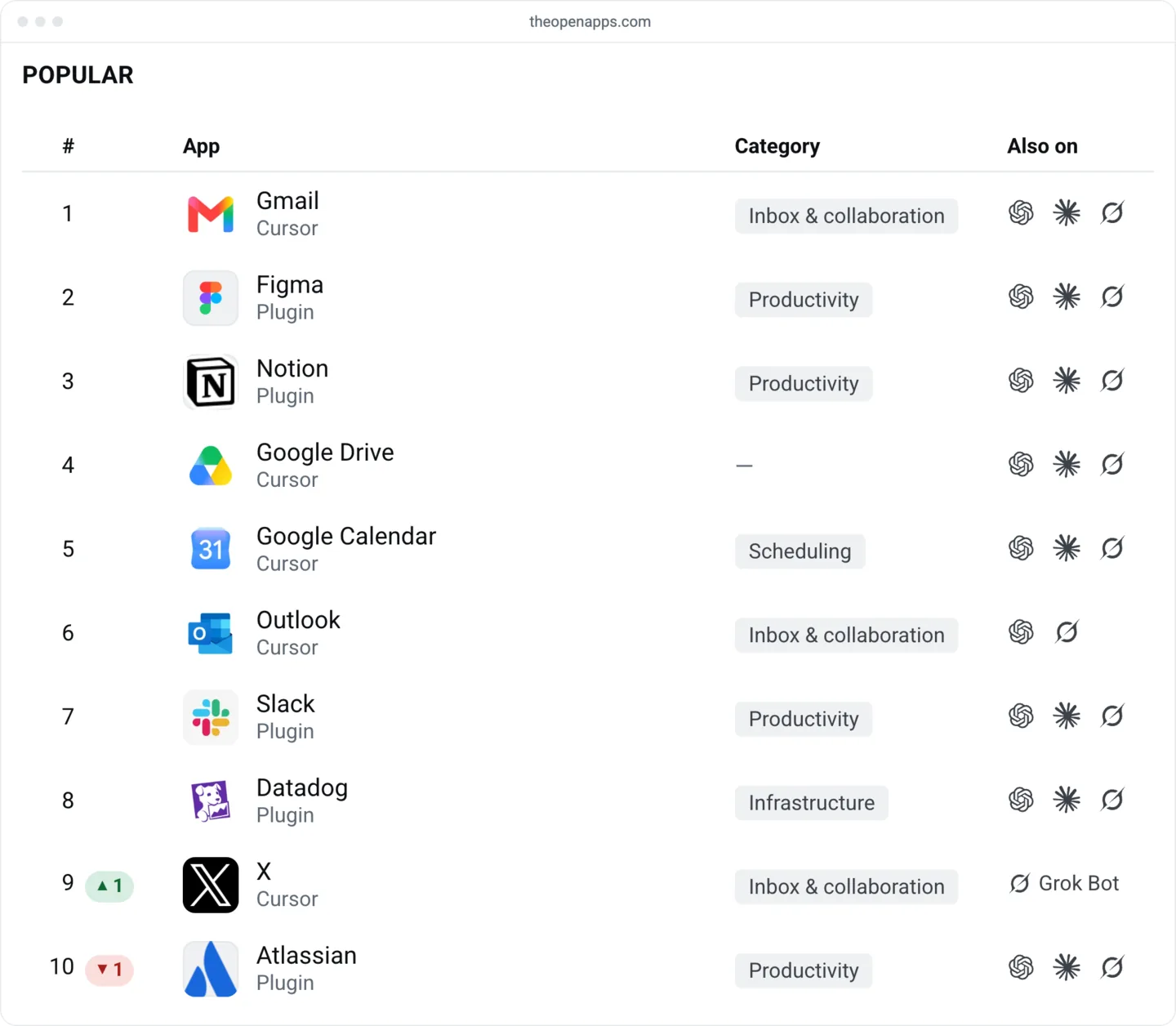
| Outside plugins | Top 50 (30) | Below (339) |
|---|---|---|
| Median description characters | 118.5 | 128 |
| Opens with a verb | 53% | 48% |
| Plugin logo | 67% | 71% |
| Curated section | 97% | 55% |
| Verified by Cursor | 77% | 30% |
| Listing tags | 67% | 17% |
A curated section, the verified line and listing tags belong mostly to the earliest plugins. Every outside plugin with a February or March store date is verified, against 9% of those from August to October. The gap for a curated section still holds within each age band, and a verb opener shows no such gap:
| Outside plugins | Store date before Aug 1 | Store date from Aug 1 |
|---|---|---|
| In a curated section | #119 | #309.5 |
| Not in one | #247 | #380 |
| Description opens with a verb | #165 | #362 |
| Description doesn't | #143 | #336 |
What this data can't tell you
- Installs and clicks. Cursor publishes neither, and Popular is an order whose inputs aren't published. Nothing here links a wording choice to installs or to a higher place.
- Who edits a listing. We can see that listed text differs from plugin.json, not who changed it or why, so we can't tell you whether your copy will be changed.
- Other screens. The 44 characters on a card and the 87 on a skill line hold at a 1,440-pixel window on the web page. Narrower windows show less; the editor's Customize view and Grok Bot may show more or less.
- How search ranks. One signed-out test of 4 terms on the web search shows what it matched, not how it orders results or how Customize search works.
- How sections and the verified line are assigned. Cursor's publisher terms leave placement to Cursor without saying how a section is chosen, and we have found no Cursor page on the verified line, so we can't say how to get either.
- What the submission form asks. The form needs a sign-in, and no Cursor page lists its fields. Forum threads describe an Owner field set to your account, an organization handle and a contact email (thread on submitting as a company, thread on a late listing). We haven't seen the form ourselves, so we can't confirm which field a reviewer reads a note in.
- How to get a company name onto "Created by". Neither
author.namenorpublisherdecides that line in our data, and we have found no Cursor page that says what does. - Whether
marketplace.jsoncan fill in for plugin.json. We didn't test an entry that sets a field plugin.json leaves out.
A listing checklist
Set .cursor-plugin/ and its components like this, with <Brand> standing in for your product:
| Field | Write | Where it shows |
|---|---|---|
name | <brand>, unique | / on the plugin page |
displayName | <Brand> | Card, plugin page title and Grok Bot |
description | <Verb> <objects> in <Brand> ... | Card (about 44 characters), plugin page, its meta description and Grok Bot |
logo | assets/ | Card (40 by 40 pixels) and plugin page |
keywords | ["<job word>", "<object>"] | Not on the web listing; Customize search, untested |
author | {"name": "<Company>", "email": "<address>"} | Not directly; "Created by" names the publisher |
Server key in mcp.json | <brand> | The plugin page's MCP list; plugin-<brand>-<brand> in approval prompts |
SKILL.md name and description | <brand>-<job>, then one plain sentence | The plugin page's skill list; / in chat |
Cursor's plugin template uses the words the listings drop: its sample description is "Minimal Cursor plugin starter with rules and skills", and its keywords include "cursor" and "plugin".
Before you submit:
- Set
nameto your brand in kebab-case, and check that it's free. Use lowercase letters, digits, hyphens and periods. Cursor's submission checklist asks for a unique name, so search the marketplace for your brand first; each plugin page shows its name in/. If Cursor already lists a plugin for your product, read Has Cursor already listed a plugin for your product? before you pick one. The name is the handle users type, so settle it now.add-plugin - Set
displayNameto the brand alone. Leave out MCP, Plugin, Cursor and any tagline. No listed outside name carries them. - Open the description with a verb and an object. "Search and update tickets", not "Connects Cursor to".
- Don't open with your own name, and keep "Cursor", "MCP", "plugin" and "Official" out of the first 44 characters. The card already prints the name above the line. Naming the product after the verb is fine: Cursor's own Trello listing opens "Manage your Trello workspace".
jq -r .description .cursor-plugin/prints what a card shows.plugin.json | cut -c1-44 - Keep the whole description under about 155 characters. It is the plugin page's meta description, and Cursor's own descriptions run a median of 57.
- Point
logoat a logo file committed in the repo. Without one, the card shows your publisher's logo. Cursor documents no size or format, but the card draws it at 40 by 40 pixels, so use a mark that reads that small. 59% of outside publishers' manifest logos are SVG. - Validate plugin.json against Cursor's schema. With the schema saved as
plugin.schema.json,npx ajv-cli@5.0.0 validate --strict=false -s plugin.schema.json -d .cursor-plugin/prints "valid", or names a field the schema rejects.plugin.json - Name the
mcp.jsonserver key after your brand. The plugin page and approval prompts show it. - Open every skill, command and subagent description with a plain sentence about what it does. Keep it to the first line, about 80 characters; the agent's trigger text can follow.
- Settle skill folder names. For most plugins the page shows the first 5 skills in name order, and a skill's name must match its folder. Renaming one later changes the
/users type.skill-name - Fill
keywordswith the words a user would type for the job. Leave out "cursor" and "plugin". The web search ignored keywords in our test, but Customize search may use them. - Make every claim checkable, and call the editor "Cursor", never "Cursor AI" or "Cursor Code". The publisher terms require accurate descriptions and let Cursor remove a plugin.
- Write the README for reviewers. State the purpose, how to install, what each skill and server does, and how a reviewer can get a test account.
- Test locally. Follow How to publish a Cursor plugin to the marketplace.
- Submit at cursor.com/marketplace/publish. In the form's own fields, not in plugin.json, you can name the one section your plugin fits.
After you're listed:
- Compare the live plugin page with plugin.json. Where they differ, the listing is the copy marketplace and Grok Bot users read.
- To change listed copy, ship it as an update. How do you update a live plugin? lists the steps. In the re-index email, say the change is listing copy.
- Check your section's newest plugins. Each section shows its 6 newest, so expect yours to leave the first row once 6 newer ones join it. Open the section on the Cursor Marketplace or its OpenApps chart, such as Productivity.
Open your plugin's section on the Cursor Marketplace at a normal window width and read your card. The name and about 44 characters are all someone browsing sees.