
What do you need before you submit?
You need a Cursor account, a public GitHub repo under a permissive license, a README and a plugin that's free to use.
- The right form. Cursor staff say the curated marketplace skews toward company integrations (thread on a community plugin) and call cursor.directory "the recommended place to publish for most plugins right now" (thread on the two queues). A company shipping a plugin for its own product should use the marketplace form; for anything else, start on cursor.directory. A plugin can be in both.
- A Cursor account. The publish form works only when you're signed in.
- A plugin meant for everyone. For a private or closed-source plugin, use a team marketplace instead. Teams and Enterprise plans have them, and an admin manages them under Dashboard > Plugins & MCPs (Cursor's plugin docs).
- A public GitHub repo with a permissive license. Cursor's plugin docs say all plugins must be open source, and the publisher terms, dated May 6, 2026, allow only permissive licenses such as MIT, BSD or Apache 2.0, not GPL, AGPL or LGPL. The docs ask for any public Git repo, but every plugin listed on Oct 25, 2026 is on GitHub, and the plugin reference turns relative logo paths into raw.githubusercontent.com addresses.
- A free plugin. The publisher terms bar charging users, directly or indirectly, for access to or use of the plugin through the marketplace. The terms don't say whether a free plugin may connect to a paid service. Outside publishers' plugins such as ZoomInfo do.
- A README. The submission checklist asks for one that documents usage and any configuration (the plugin reference). If your server needs an account, say there how a reviewer can get one. In April, a builder noted that the form didn't ask for test credentials (thread on submitting as a company).
- A privacy policy and terms of service. The publisher terms ask you to make both visible to users but don't say where, so link both from the README and from the page in the manifest's
homepagefield. The terms also limit plugin data to what the plugin's stated function needs, and they forbid selling it or training models on it. - An accurate description. The terms require accurate plugin details and ask you to call the product Cursor, not Cursor AI.
- A business Cursor can verify. Cursor checks each publisher's identity and business, and may reject a plugin without giving reasons (publisher terms).
- Local plugin imports, on Enterprise. Testing needs the Allow Local Plugin Imports setting, which is off by default on Enterprise. An admin turns it on under Dashboard > Settings > Security & Identity > Marketplace and Plugins (Cursor's plugin docs).
The publish form may file your submission under you instead of your company, so check its Owner field. If it shows only you, put the company's name in the manifest's author.name and say in the form's description that it's a company submission. Cursor staff suggested this in April, when the form had no company option (thread on submitting as a company). In September, a builder on a company team reported that the form filed theirs under the team (thread on the two queues).
If you're shipping the same server to other stores, How to submit an app to ChatGPT, Claude, Cursor and Grok Bot compares all of them, and How to submit a plugin or connector to Claude covers Claude's side.
What goes in plugin.json?
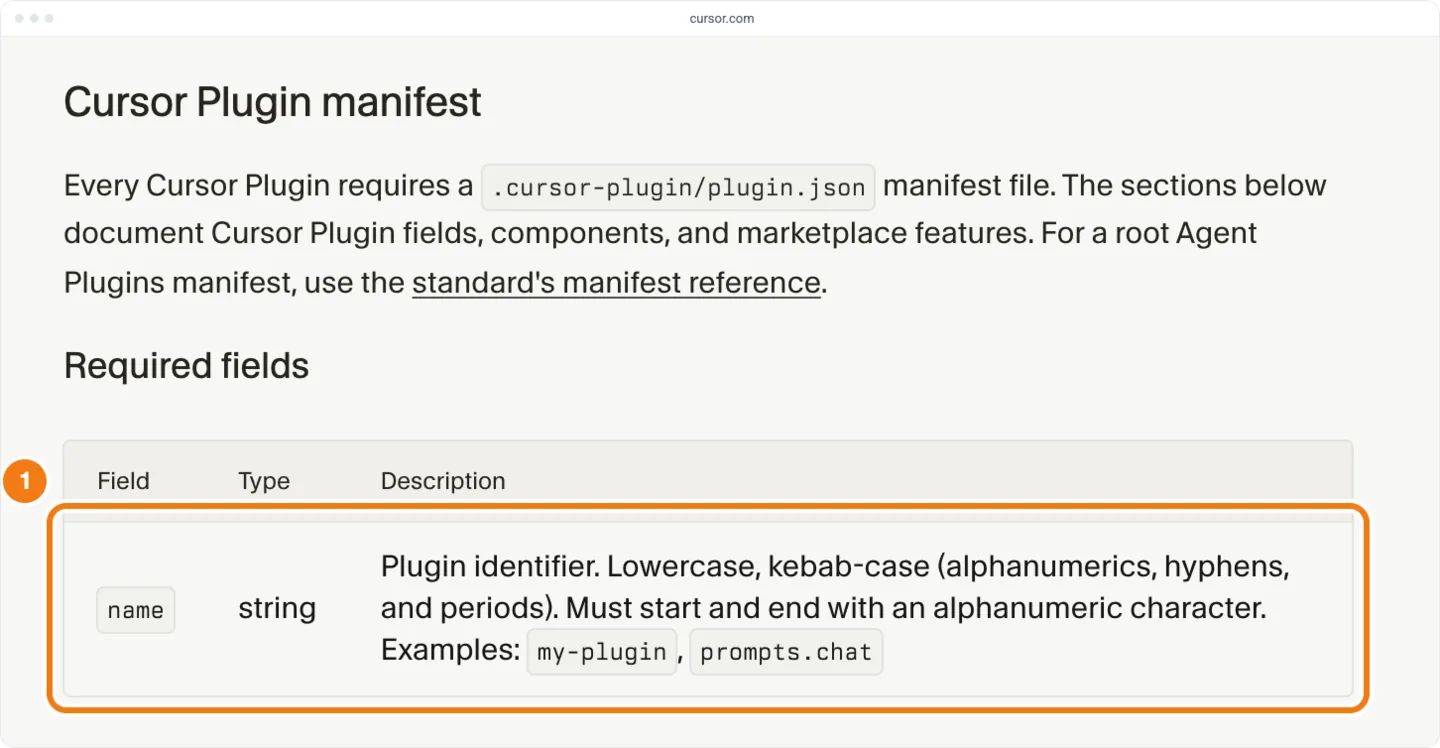
A Cursor plugin is a folder with its manifest at .cursor-plugin/. Only name is required, so {"name": "acme-tasks"} is a valid manifest (Cursor's plugin docs).
To package an MCP server, add an mcp.json that tells Cursor how to reach it: a url for a remote MCP server, or a command that starts a local one. That file and the manifest are enough for Cursor to load the plugin. To submit it, you also need a description and a README, which the submission checklist asks for (the plugin reference), and a permissive LICENSE file, which the publisher terms require.
Cursor also reads the open Agent Plugins format. Its plugin.json sits at the folder's root and carries the standard's $schema identifier. That format holds only skills and MCP servers (Cursor's plugin docs).
| Field | Required | What it does | Outside publishers' listings that carry it |
|---|---|---|---|
name | Yes | The plugin's id: lowercase kebab-case of letters, numbers, hyphens and periods, starting and ending with a letter or number | 100% |
description | No | What the plugin does; the submission checklist asks for one that states its purpose | 98% |
author | No | Who made it; a company puts its name in author.name | Data is not available |
logo | No | The logo's path; commit the file to the repo | 71% |
variables | No | A JSON Schema of the keys mcp.json needs, used there as ${VAR} placeholders | 5% |
| Component paths | No | Where the skills, rules, agents, commands, hooks and MCP config live, if not in the default places | Data is not available |
The other optional fields are version, homepage, repository, license and keywords (the plugin reference). Cursor's plugin template also sets displayName, which the reference doesn't list. Without paths in the manifest, Cursor finds a plugin's parts in default places: skills/, rules/, agents/, commands/, hooks/, and mcp.json at the plugin's root.
A repo for one server holds these files:
| File | Needed | What it holds |
|---|---|---|
.cursor-plugin/ | Yes | {"name": "acme", "description": "Create and search Acme tasks", "author": {"name": "Acme Inc"}, "license": "MIT", "logo": "assets/ |
mcp.json, hosted server | For an MCP server | {"mcpServers": {"acme": {"url": "https:// |
mcp.json, local server instead | For an MCP server | {"mcpServers": {"acme": {"command": "npx", "args": ["-y", "@acme/ |
skills/ | No | One folder per skill. Its frontmatter needs a name that matches the folder and a description, as in name: create-task and description: Create an Acme task from a request (Cursor's skills docs) |
README.md | To submit | Usage, setup, how a reviewer gets an account, and links to your privacy policy and terms |
LICENSE | To submit | A permissive license such as MIT |
assets/ | No | The logo, named in logo by this relative path |
.cursor-plugin/ | Only for several plugins | A list of the repo's plugins, as in {"name": "acme-plugins", "owner": {"name": "Acme Inc"}, "plugins": [{"name": "acme", "source": "acme"}]}. 11 of 354 outside publishers' repos hold more than one plugin |
For a local server, publish it as a package on npm or PyPI and start it by command: npx as in the table, or uvx for a Python package. Don't commit a binary. Cursor's marketplace security page says marketplace plugins ship none, though an example in the plugin reference starts one from ./. To start a script bundled in the plugin, refer to it through ${CURSOR_PLUGIN_ROOT}, the plugin's install path. Cursor doesn't expand the Agent Plugins standard's ${PLUGIN_ROOT}. Most outside publishers' listed plugins with an MCP server point at a hosted one, and most of the rest start a published package with npx or uvx. A local server needs Node.js or uv on the user's machine, and a hosted one needs nothing there.
Cursor supports OAuth for remote servers (Cursor's MCP docs). With OAuth, the repo holds no key and each user signs in for themselves, so use OAuth if you can.
Cursor signs in with the authorization code flow and PKCE. By default it registers itself through Dynamic Client Registration (DCR), as a public client with no secret. If your server doesn't support DCR, add an auth object with a public CLIENT_ID to the server's entry in mcp.json, as in "auth": {"CLIENT_ID": "acme-cursor"}. Leave out CLIENT_SECRET, because the repo is public. Either way, your OAuth provider has to allow Cursor's two fixed redirect URLs:
| Cursor client | Redirect URL |
|---|---|
| Web and Cursor Agents | https:// |
| Desktop app | http:// |
A server that needs a key declares it in variables, as in "variables": {"type": "object", "properties": {"API_TOKEN": {"type": "string"}}}, and uses it in mcp.json. A hosted server takes it in headers, as in "headers": {"Authorization": "Bearer ${API_TOKEN}"}, and a local one in env, as in Cursor's plugin template. A plugin's placeholders take this ${VAR} form, not the ${env:NAME} form a personal mcp.json uses.
Cursor's docs and its staff disagree on who can set a key. The plugin reference says values are set in Cursor's dashboard under Plugins > Configure, and its section on variables names team admins as the ones who set them. In April, Cursor staff said marketplace plugins had no built-in UI for MCP settings and suggested adding the server to ~/ by hand (thread on plugin settings); that answer may be out of date. We have not found how someone outside a team sets a key, or how to test ${VAR} values locally. 95% of outside publishers' listings declare no variable. If your server needs a key anyway, explain in the README how a user adds the server to ~/ with their own key, and test with a key you never commit.
| Component | Share of listed plugins |
|---|---|
| MCP server | 85% |
| Skills | 66% |
| Rules | 16% |
| Commands | 11% |
| Hooks | 9% |
| Agents (subagents) | 8% |
53% of listed plugins have both an MCP server and skills, 30% are an MCP server alone, and 15% have no MCP server. 13% of all listed plugins carry skills but no MCP server. Plugins with skills carry 7.8 on average, and 36% of all listed plugins carry 4 or more. If you're packaging a server you already run, add skills that show the agent when and how to call it. How to write a Cursor plugin listing people find covers the description and logo.
How do you publish a Cursor plugin, step by step?
- Start the repo. Clone Cursor's plugin template, install Cursor's Create Plugin plugin from the marketplace to scaffold one, or add
.cursor-plugin/to your own repo.plugin.json - For one plugin, flatten the template. Move one starter plugin's files from
plugins/to the repo root and delete.cursor-plugin/, as the template's README says. Deletemarketplace.json scripts/too: it checks only the multi-plugin layout and fails whenvalidate-template.mjs marketplace.jsonis missing. - Add the parts. Put skills, rules and the rest in the default folders, in the formats the plugin reference gives, and the MCP server in
mcp.json. Declare every${VAR}thatmcp.jsonuses invariables. - Install it locally. Copy the plugin folder to
~/, then restart Cursor or run Developer: Reload Window. Copy it rather than symlinking it: Cursor loads a symlink there only if it points inside that folder..cursor/ plugins/ local/ <name> - Check that it loaded. Open Customize in Cursor and find your rules, skills or MCP servers there. In approval prompts, a plugin's MCP server shows as
plugin-<plugin>-<server>. - Try a tool. Sign in to the server if it asks, then ask the agent to call one of its tools. If sign-in stops with a redirect URI error from your OAuth provider, the provider doesn't allow Cursor's redirect URLs yet (see the redirect URLs above).
- Run the checklist. Go through the 11-item submission checklist in the plugin reference (pictured below) and fix anything that fails. If you kept the template's multi-plugin layout, also run
node scripts/, which prints Validation passed when the layout is right.validate-template.mjs - Push it. Push the plugin to a public GitHub repo with a permissive LICENSE file.
- Collect what the form asks for. Forum threads show that besides the repo link, the form asks for an organization name, a handle, a contact email and a description (thread on a late listing, thread on submitting as a company). In the description, say what the plugin does, whether it's a company submission and how a reviewer gets an account.
- Submit the link once. Sign in, open cursor.com/marketplace/publish, check the Owner field, fill in the form and click Submit Application.
- Screenshot the confirmation screen. A "Thanks for applying" page means the submission went through. No confirmation email follows it (thread on a submission with no reply), and there is no status page (thread on the two queues). Note the date, the handle and the contact email you entered.
- Wait for email. Cursor's team follows up by email once it has looked at the plugin. Don't submit again: Cursor staff say a second submission creates a duplicate (thread on a submission with no reply).
- If three weeks pass with no email, write to the marketplace team. Cursor staff say reviews can take a few weeks. Email marketplace-publishing@cursor.com, the address staff give for the marketplace team (thread on a late listing). Give the plugin name, the repo URL, the handle, the day you submitted and the contact email you used.
- If the email gets no reply, post on the forum. Give the same details on Cursor's forum. In three of the forum threads cited here, builders' emails went unanswered and staff replied to their forum posts.
- Look for the listing. Search the marketplace for your plugin's name, or open cursor.com/marketplace/ followed by its
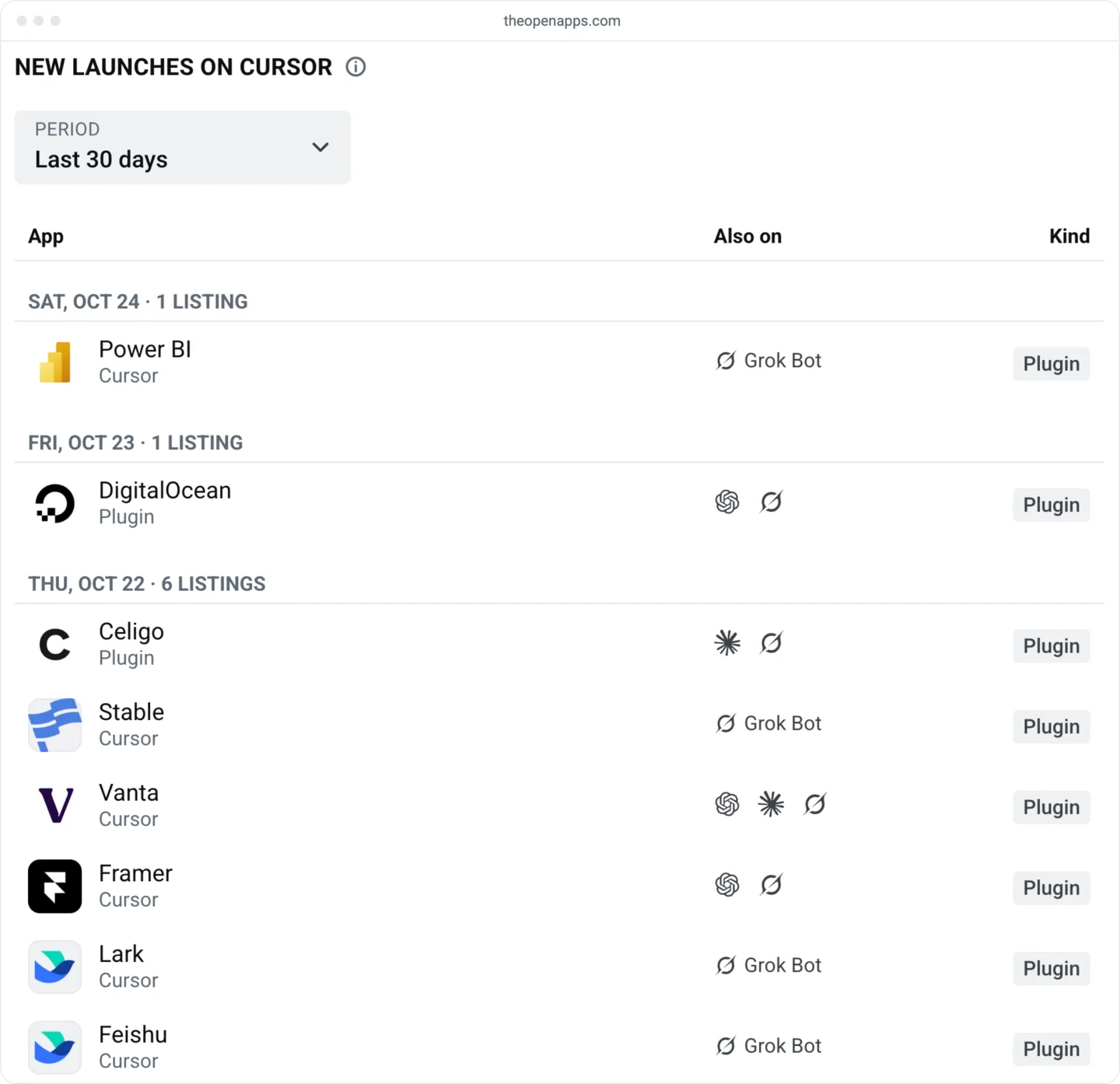
name, as in cursor.com/marketplace/speko. Until the plugin is live, that address shows Marketplace Plugin Not Found. - Find it on OpenApps. On New launches on Cursor, set Kind to Plugins, because the MCP-server rows there are cursor.directory entries. That page files each plugin under its store date, the creation date Cursor's marketplace gives the plugin. The store date is usually the day the plugin went public, but it can be weeks earlier, so a new plugin may sit well below the top. To be sure, search for it by name in OpenApps search.
The template's README also says to send the repo link by Slack or email. Cursor's docs send you to the publish form instead.
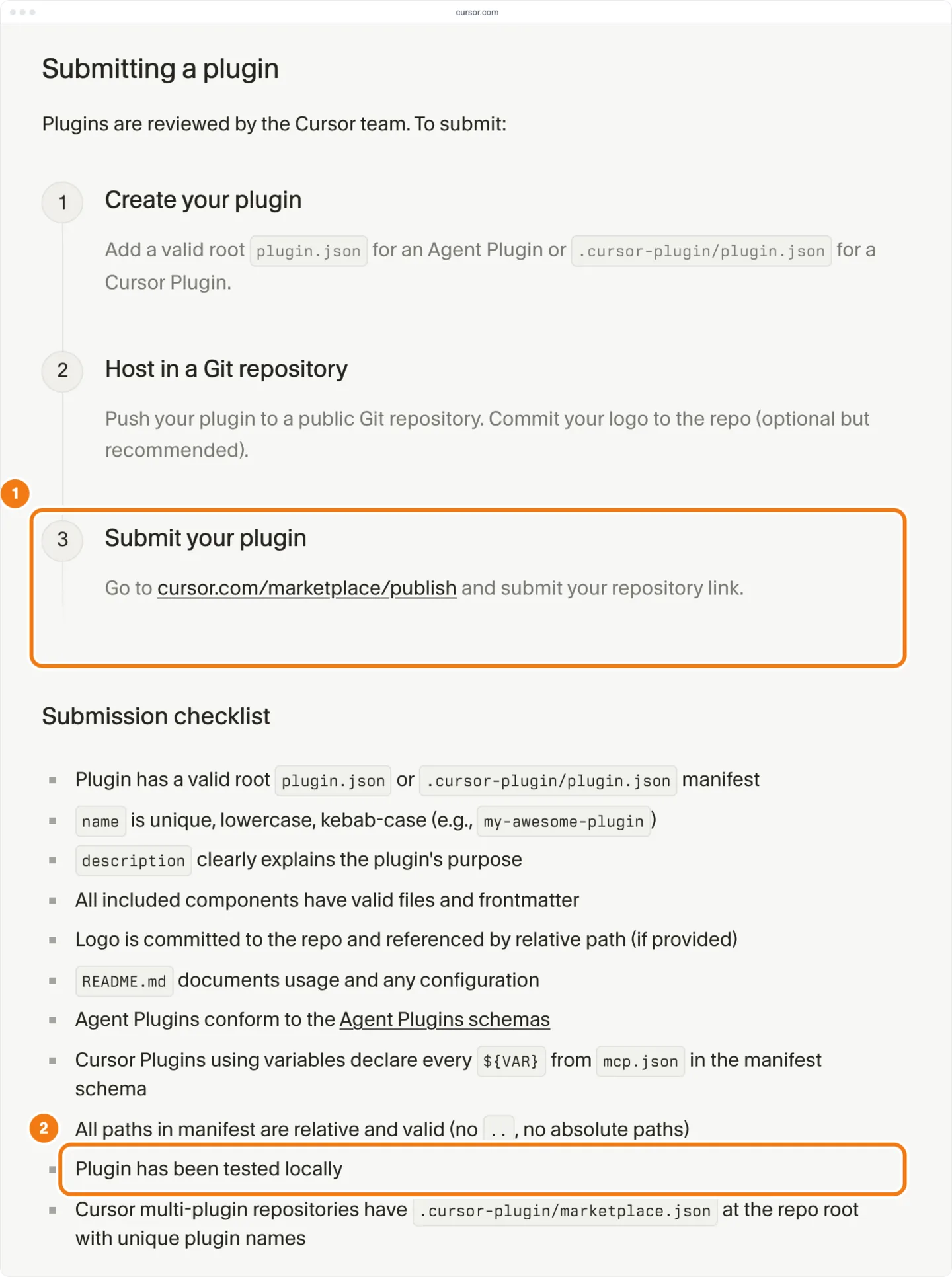
When Cursor staff confirmed that one repo was ready, they named its manifest, MCP config, skills, license and logo (thread on a submission with no reply).
How long does review take?
Cursor publishes no review time. Cursor's plugin docs say every plugin is reviewed by hand, and Cursor's marketplace security page says review covers security, data handling and quality. On Oct 23, Cursor staff said reviews "can take a few weeks" (thread on a pending submission). In three forum cases, builders waited 11 to 47 days, and two more plugins were still unlisted after 21 and 31 days.
Hearing nothing while you wait is normal. The form sends no confirmation email, the "Thanks for applying" screen is the only receipt, and a second submission creates a duplicate (steps 11 and 12 above).
The table lists the waits builders reported. They are cases people complained about, so they skew long, and the submission dates are the builders' own.
| Case | Forum says | Store date | Days waited |
|---|---|---|---|
| Speko | Submitted Aug 20 | Oct 6 | 47 |
| ZoomInfo | Jul 1: waiting about a month | Jul 1 | 30 about |
| Azure Cosmos DB | Mar 4: recently submitted | Mar 15 | 11 at least |
| Zell | Submitted Sep 24 | Not listed on Oct 25 | 31 at least |
| WoWSQL | Submitted Oct 4 | Not listed on Oct 25 | 21 at least |
A plugin's store date is usually within a day of when it went public. It isn't the submission date, and we can't tell whether it marks approval, so it can't measure review. Of the 49 plugins that went public from Oct 12 to Oct 24, 40 did so within a day of their store date, and 3 more than a week after it. Google Cloud BigQuery has a store date of Sep 14 and went public Oct 22. Plan in weeks, from the forum waits above.
How many plugins get in each week?
The Cursor Marketplace adds about two dozen plugins a week. 224 plugins still listed on Oct 25 have a store date in the 8 weeks from Aug 24 to Oct 18, a median of 26 a week (21 to 45). Cursor published 66 of them itself, and outside publishers added 158, a median of 20.5 a week.
| Week of | All | By Cursor | Outside publishers |
|---|---|---|---|
| Aug 24 | 45 | 29 | 16 |
| Aug 31 | 27 | 1 | 26 |
| Sep 7 | 23 | 10 | 13 |
| Sep 14 | 21 | 3 | 18 |
| Sep 21 | 25 | 10 | 15 |
| Sep 28 | 24 | 1 | 23 |
| Oct 5 | 27 | 3 | 24 |
| Oct 12 | 32 | 9 | 23 |
Outside publishers' pace rose in late summer. From February to July they added a median of 28.5 plugins a month; August brought 49, September 80, and October 64 by Oct 25. We can't see whether more builders applied or review moved faster. In a typical week, about 20 outside plugins go public. The Cursor charts show where each one ranks in Popular, Cursor's own order.
Has Cursor already listed a plugin for your product?
Check the Cursor store page before you build. 22% of plugins listed on Oct 25, 2026 sit in Cursor's own cursor/ repo, and 95 of those are vendor integrations Cursor packaged itself, such as Zoho, Workday, Vanta, Gusto and Tailscale. If Cursor already lists one for your product, email marketplace-publishing@cursor.com before you build a second. We have not found Cursor's policy on this documented.
| Listed plugins | Cursor's own repo | Outside publishers |
|---|---|---|
| Share of listed plugins | 22% | 78% |
| Repos | 1 | 354 |
| Publisher shown | Cursor | The publisher's name |
| Verified mark | All | 34% |
Cursor shows a verified mark on some publishers. We have not found its rules documented.
Should you use cursor.directory instead?
cursor.directory is a community directory, separate from Cursor's marketplace, and Cursor staff recommend it for most plugins (thread on the two queues). A cursor.directory entry goes up within a day and you manage it yourself. It appears only on cursor.directory, so it doesn't reach Cursor's marketplace or Grok Bot. You can do both: at least 53 of the 354 outside publishers' marketplace repos (15%) also have a cursor.directory entry.
Cursor's marketplace security page says the marketplace is curated, that Cursor works with a small group of trusted partners, and that it plans to open up more broadly later. In May, a builder reported that the marketplace team had declined their plugin for now and suggested starting on cursor.directory (thread on submitting as a company).
| Cursor Marketplace | cursor.directory | |
|---|---|---|
| What it is | Cursor's curated marketplace | A community directory |
| Where you submit | cursor.com/marketplace/publish, signed in | cursor.directory/plugins/new, signed in with GitHub or Google |
| Review | By Cursor, by hand | Entries stay pending; we have not found its review rules documented |
| After you submit | No status page; the team emails | Entry goes up; you edit it yourself |
| From submission to listing | Not published; forum cases 11 to 47 days | Within a day for 740 of 742 entries dated Oct 12 to 25 |
| Reaches Grok Bot | Yes | No |
| New entries, 8 weeks to Oct 18 | 224 | At least 1,697 |
| Verified mark | 34% of outside publishers' plugins | Under 0.1% of entries |
To list on cursor.directory:
- Sign in. Go to cursor.directory and sign in with GitHub or Google.
- Open the submission form. Choose Submit a Plugin, which opens cursor.directory/plugins/new.
- Fill in the form and submit. The form's fields appear only after you sign in.
- Check the entry. It shows on cursor.directory while its status still reads pending.
In the 8 weeks to Oct 18, cursor.directory took at least 7.6 times as many new entries as the marketplace. Its entries stay marked pending after they go up: users submitted all 742 entries dated Oct 12 to 25, and every one was still pending review on Oct 25. Most are MCP-server plugins too: 91% bundle an MCP server, and 3% are rules with no MCP server or skills.
Cursor Marketplace plugins
cursor.directory entries
| Bundles | Marketplace plugins | cursor.directory entries |
|---|---|---|
| An MCP server | 85% | 91% |
| Skills | 66% | 22% |
| Skills, no MCP server | 13% | 6% |
| Rules, no MCP server or skills | 0% | 3% |
A marketplace listing reaches Grok Bot too: on Oct 25, 2026, every listed marketplace plugin but two (GitHub and 1Password) was also on Grok Bot. How to get a plugin into Grok Bot covers that route.
How do you update a live plugin?
A listed plugin doesn't follow your repo. The marketplace pins 98% of outside publishers' plugins to one commit, so a push changes nothing until Cursor re-indexes the plugin, and Cursor reviews each update by hand (marketplace security page). The automatic GitHub updates in Cursor's plugin docs apply only to team marketplaces imported from a repo. To ship an update (the publisher terms call the request a re-index):
- Push your fixes. Push them to the public repo, bump
versioninplugin.json, and note the commit SHA. - Uninstall the marketplace copy. An installed marketplace plugin with the same name takes precedence over the local one (Cursor's plugin docs).
- Test it locally. Copy the plugin folder at that commit to
~/and check it as in steps 4 to 6 above..cursor/ plugins/ local - Ask for the re-index. Email marketplace-publishing@cursor.com with the plugin name, the repo and the commit to put live, as Cursor staff asked on the forum (thread on a late listing).
In the thread on a late listing, Cursor staff said installed copies pick up a new revision on the next restart or when the window regains focus. Of 339 outside publishers' plugins listed on Oct 9, 13 (3.8%) had moved to a new commit by Oct 25.
Once Cursor has approved one of your plugins, the publisher terms say a new plugin needs no new application. Ask the marketplace team for a re-index, as you would for an update.
What our data can't tell you
- Submissions and rejections. Cursor publishes neither and gives no reasons for a decline, so we can't give a review time or an acceptance rate. The forum cases are what builders reported, not a sample.
- The approval date. Cursor shows none, so we can't measure review.
- Plugins still waiting. A plugin in review isn't in any count here (right-censoring), and the weekly and monthly counts include only plugins still listed on Oct 25.
- Why a plugin got in. The data shows what listed plugins contain, not what reviewers weighed.
- Installs. Cursor publishes no install counts, and Popular is an order, not a count.
Read the shares above as what accepted plugins look like, not as a checklist that guarantees a listing. Store-wide totals are on store statistics.
Announce the launch on the day cursor.com/marketplace/ followed by your plugin's name opens, not the day you submit. Builders on the forum waited 11 to 47 days.