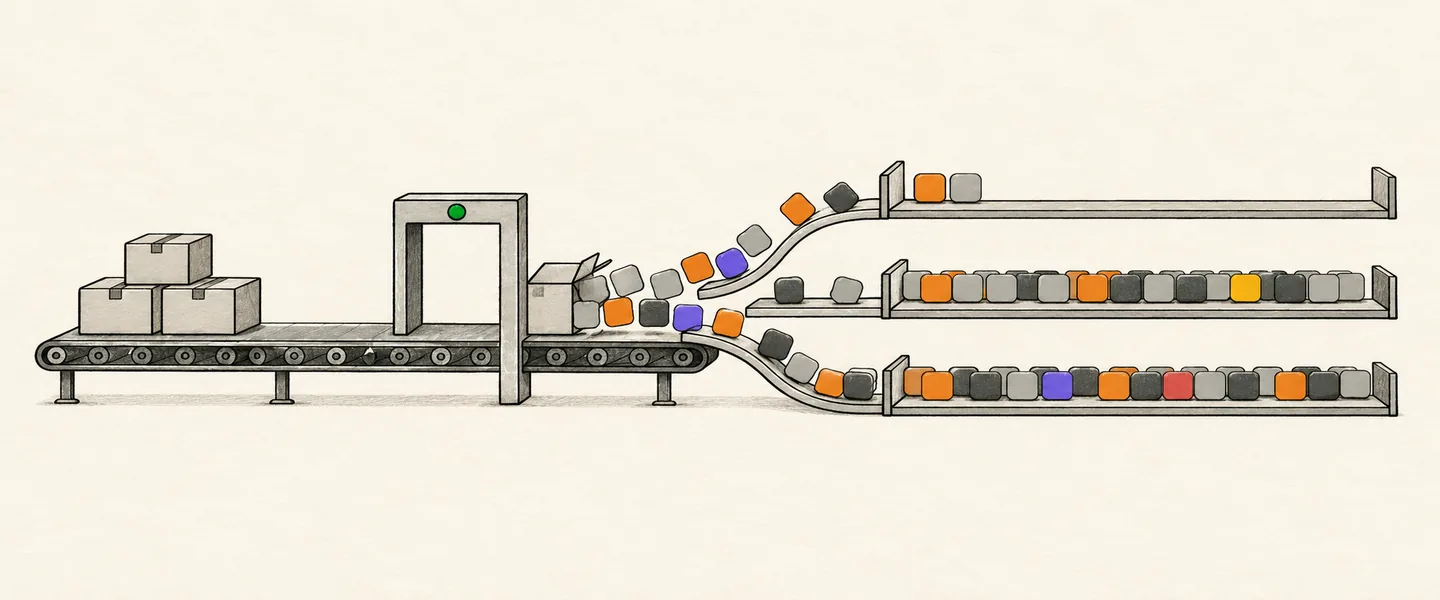
Is it an app or a plugin now?
On Jul 9, 2026, the Plugin Directory replaced the App Directory in ChatGPT (ChatGPT release notes), and OpenAI now handles a directory submission as a plugin. Its plugin submission guide describes one flow for ChatGPT and Codex: you upload a ZIP package to the plugin portal (the Plugins page at platform.openai.com/plugins), and the Apps SDK app you built becomes the plugin's MCP server. A plugin connects one MCP server, and the server has to be in the first ZIP; you can't add one later to a plugin that started with skills only.
Guides written for the earlier web form, such as alpic.ai's (Dec 18, 2025) and gend.co's (Oct 6, 2025), describe a different process. The right-hand column follows OpenAI's pages as they read on Oct 25, 2026, including the submission errors reference:
| Guides for the old form say | OpenAI's pages, Oct 25, 2026 |
|---|---|
| Fill in a web form | Upload a plugin ZIP |
| Upload 3 or more screenshots | Add up to 3 starter prompts; add screenshots only if the scan finds a UI template |
| Pick countries in the form | Set publication.countries in the manifest, then check the imported countries in Review details |
| Expect a case ID by email | Quote the plugin ID the portal shows |
| Turn on Developer Mode to test | Select Add custom MCP server on ChatGPT's Plugins page |
| Only owners can submit | Owners, or members with the Apps Management Write role |
OpenAI now calls everything you submit a plugin, and the steps below use its word. Once a plugin is live, our charts and data list it as an app. Our glossary's ChatGPT plugin entry means something else: an older family of listings whose ids start with plugins_.
What to do after launch is in the launch checklist for a ChatGPT app. How to submit an app to ChatGPT, Claude, Cursor and Grok Bot compares the stores, and How to submit a plugin or connector to Claude covers the same MCP server on Claude.
What do you need before you submit?
Before you submit, you need a verified identity, the owner or Apps Management Write role, a project with global data residency and a public HTTPS MCP server. You also need four public URLs (website, support, privacy policy and terms), a test account without MFA if your plugin needs sign-in, and the review materials: 5 positive and 3 negative test cases, a demo video and release notes. The submission guide, the plugin guidelines and OpenAI's review requirements page set these rules:
- Organization owners can submit. Other members need the Apps Management Write role, which an owner grants under organization roles.
- Complete individual or business verification in your organization settings. The directory shows the name on that identity as the publisher, whatever the ZIP says.
- Submit from a project with global data residency. Projects with EU data residency can't submit plugins with MCP servers, so create a global one in the same organization if you need to.
- Submit only if you want the plugin public in the countries you set. For private or workspace use, connect a custom MCP server instead.
- Get a ChatGPT plan that can add a custom MCP server, and the ChatGPT desktop app. You add the server on ChatGPT web and test the packaged plugin in the desktop app. Business, Enterprise and Edu plans get full MCP, write actions included. On Business, only admins and owners can add a server; on Enterprise and Edu, admins can let members add one. Pro can connect read and fetch servers only (help article on custom MCP servers).
- Host one remote MCP server on public HTTPS, at one URL that works for every user. Template URLs per customer workspace are only for trusted developers with an established OpenAI relationship. A local (stdio) server goes through OpenAI's desktop-only submission path instead, which is open only to approved partners.
- Your server's sign-in can be none, OAuth or a mix of the two. The portal has no API-key or bearer-token option, so move to OAuth or contact OpenAI if your server needs a key.
- Have four public URLs ready: a website, a support contact, a privacy policy and terms of service, all naming the same publisher as the submission. The guidelines list what the privacy policy must cover.
- If your plugin needs sign-in, set up a dedicated test account with sample data. It has to sign in without MFA, email or SMS codes, magic links or a private network.
- If your server returns UI, set each UI resource's
_meta.ui.cspto list the exact domains the component fetches from (review requirements, UI guide). - Prepare the review materials: 5 positive and 3 negative test cases, a demo video URL the reviewer can open that shows the main use cases on each supported surface, and release notes for this version. Final submission fails without them.
Test it in ChatGPT first
Add your server from ChatGPT's Plugins page as OpenAI's testing guide shows. Test the server there first, then a packaged test copy in the ChatGPT desktop app, and build the ZIP last.
Test the server in ChatGPT web
- Call every tool directly: run
npx @modelcontextprotocol/and try normal inputs, edge cases, missing identifiers and empty results.inspector@latest - Open ChatGPT's Plugins page and select the plus button.
- Select Add custom MCP server.
- Enter a name and description, then the server URL with its
/path.mcp - Set up sign-in.
- Read the risk warning and select I understand and want to continue.
- Select Create as a plugin. The tools the server lists appear when it worked.
- Copy the id that starts with
plugin_asdk_appfrom the browser URL. The desktop test needs it. - Open your personal plugins, open the plugin and select the plus button to install it, as OpenAI's plugin quickstart shows.
- On chatgpt.com, switch the tab at the top from Chat to Work.
- Start a new Work chat, type
@and choose your plugin. - Run a prompt set: direct requests, indirect requests, follow-ups, write actions and requests the plugin shouldn't handle. Note which tool ran and what came back.
- Redeploy after you change a tool's name, description, schema or annotations.
- Reload the tools from the server's connection on ChatGPT's Plugins page, as the testing guide shows.
- Rerun the prompt set in a new conversation.
Test the packaged plugin in the desktop app
OpenAI's plugin package guide builds this test copy with @plugin-creator, which wires your server in through a .app.json file. The ZIP you submit can't contain that file, so the test copy and the ZIP are two separate folders.
- In Work mode in the ChatGPT desktop app, ask
@plugin-creatorto create a plugin for ChatGPT and Codex from yourplugin_asdk_appid, with a personal marketplace entry. - Check that
.app.jsonmaps the server to that id. - Check that the
appsfield in.codex-plugin/points toplugin.json ./..app.json - Create the onboarding skill at
skills/. Its folder must sit directly underget-started/ SKILL.md skills/. - Start
SKILL.mdwith YAML front matter between---lines that holds anameand adescriptionof 1,024 characters at most. - Under the front matter, write a short body that tells the user how to connect and gives a first prompt.
- In
.codex-plugin/, setplugin.json extensions["com.openai"].onboardingSkillto./.skills/ get-started/ SKILL.md - Restart the ChatGPT desktop app.
- In Work mode or Codex, open the Plugins Directory and choose your marketplace. Your plugin is listed there when the entry worked.
- Install the plugin.
- Run its setup and check that the get-started skill opens.
- Rerun the prompt set in a new conversation.
Keep the runs that passed, because your review test cases come from them. A custom MCP server connects on ChatGPT web only, and the packaged plugin installs in the desktop app, yet the guidelines also require plugins to work on mobile. We have not found a documented way to test a plugin on mobile before review. You can still check each UI resource at 375 pixels wide, in light and dark theme, for example in your browser's device view.
How do you build the plugin ZIP?
OpenAI's plugin package guide accepts two layouts, a portable one and a Codex one. These steps build the portable one, which holds four parts:
| File | What it holds |
|---|---|
plugin.json | $schema, name and version, and the OpenAI settings (keys in the next table) |
mcp.json | The one remote server, its URL and its sign-in settings |
skills/ | The onboarding skill from your test copy |
assets/ | The logo |
com.openai is one key with a dot in it, not a com key holding an openai key. If plugin.json has no "com.openai" object, OpenAI reads these settings from .codex-plugin/ instead, and this ZIP has no such file. The keys of both files, with the values left out:
| File or object | Keys |
|---|---|
plugin.json | {"$schema": …, "name": …, "version": …, "extensions": {"com.openai": {"interface": {…}, "onboardingSkill": …, "review": {…}, "publication": {…}}}} |
"interface" | {"displayName": …, "shortDescription": …, "longDescription": …, "developerName": …, "category": …, "capabilities": […], "defaultPrompt": […], "websiteURL": …, "supportURL": …, "privacyPolicyURL": …, "termsOfServiceURL": …, "logo": …} |
"review" | {"test_cases": {"positive": […], "negative": […]}, "demo_recording_url": …} |
"publication" | {"countries": […], "release_notes": …} |
mcp.json | {"$schema": …, "mcpServers": {"<name>": {"type": "streamable-http", "url": …, "extensions": {"com.openai": {"auth": {…}}}}}} |
- Make a new folder for the ZIP.
- Copy
skills/andassets/into it from the test copy. Leave.app.json,.codex-plugin/and any lifecycle hooks behind: a ZIP with app references or hooks can't be submitted. - Add
plugin.jsonat the folder root, laid out as in the table above; OpenAI's complete metadata examples show one filled in. Set$schemato the URL of the agent-plugins.org plugin schema, version 1.0.0, and putnameandversionat the top level. - Under
extensions["com.openai"].interface, add the listing fields from the field table below. - Set
extensions["com.openai"].onboardingSkillto./.skills/ get-started/ SKILL.md - Under
extensions["com.openai"].review, write 5 positive cases intest_cases.positiveand 3 negative cases intest_cases.negative, taken from runs that passed. - Put the demo video URL in
review.demo_recording_url. - Under
extensions["com.openai"].publication, put this version's notes inrelease_notes. - Set
publication.countries(see the countries section). - Add
mcp.jsonat the root. Set its$schemato the URL of the agent-plugins.org MCP schema, version 1.0.0 and put one server undermcpServers.<name>, withtype: "streamable-http", its publicurl, and its sign-in settings underextensions["com.openai"].auth. - Put the logo file in
assets/and pointlogoat it with a./path. - Zip the one plugin folder, with no sibling files beside it, at 100 MB or less.
Each positive case has a description of the scenario, the user's prompt, the tools you expect in tools_triggered and the result you expect in expected_behavior. Each negative case has a prompt the plugin shouldn't act on and a description that says why and gives the refusal, question or safe fallback you expect. The review needs exactly 5 and 3. The upload accepts partial lists, so finish them before you submit. Keep reviewer credentials out of the package: the ZIP rejects them, and you enter them in the portal.
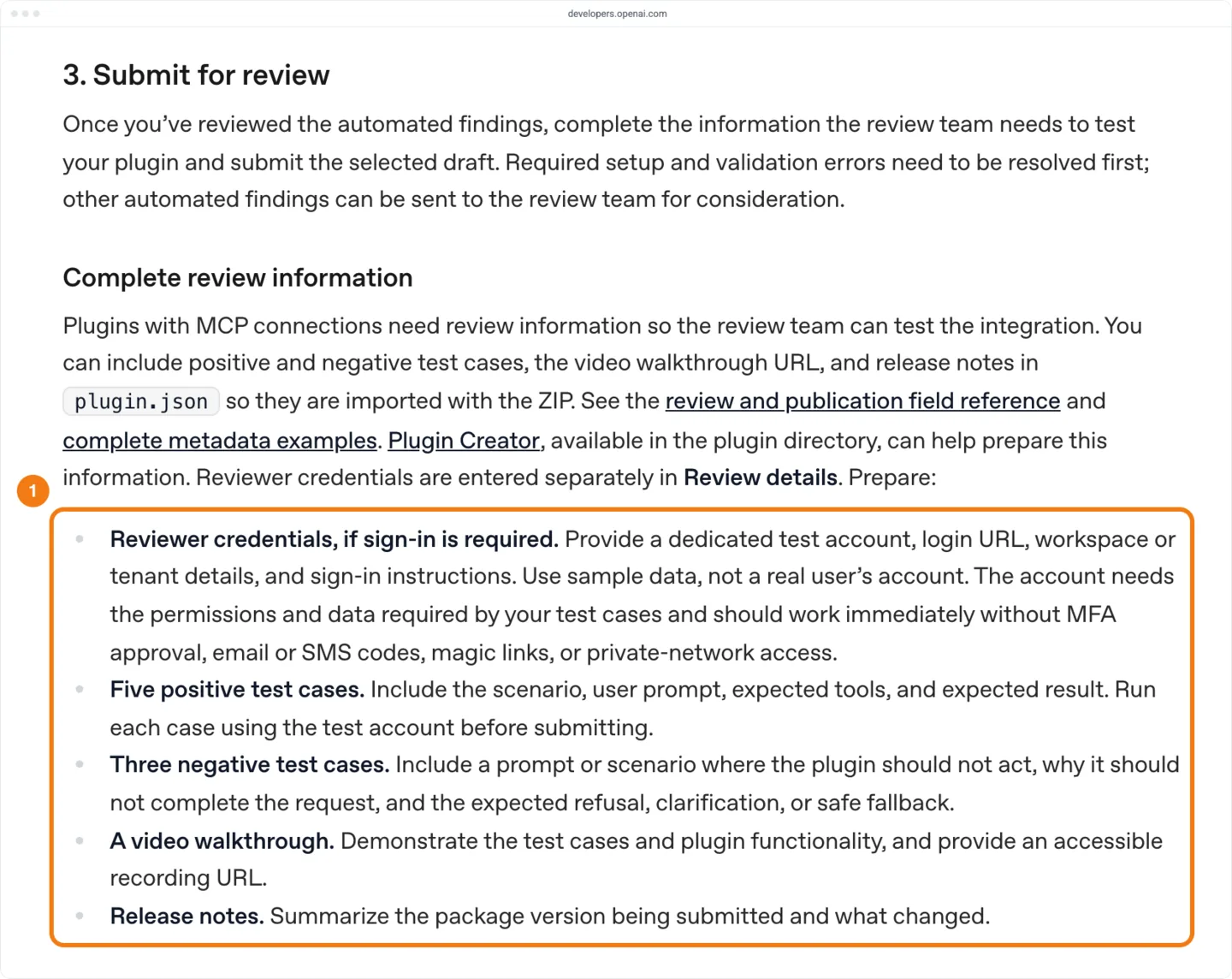
These are the fields the directory and the review use:
| Field | What it holds | Rule |
|---|---|---|
name | The package's stable id | 64 characters at most: lowercase letters, numbers and single hyphens. The name plus : and the skill's name must also fit in 64. An update must keep it |
version | The release version | A semantic version, such as 1.0.0; each new release needs a new one |
displayName | The name shown in the directory | 30 characters at most |
shortDescription | The line under the name | 30 characters at most |
longDescription | The full description | 4,000 characters at most |
developerName | The publisher name | Required, 80 characters at most; use your verified identity's name |
category | The directory category | Required at submission: Productivity, Creativity, Developer Tools, Business & Operations, Data & Analytics, Communication, Education & Research, Security, Finance, Healthcare, Travel, Entertainment or Other. A ZIP without it gets Other |
capabilities | Capability labels | Up to 20, 120 characters each |
defaultPrompt | Starter prompts | Up to 3, 128 characters each, with no @mentions |
websiteURL, supportURL, privacyPolicyURL, termsOfServiceURL | Where users and reviewers check you | HTTPS; all four required for MCP review |
logo | The plugin's icon | Square, at least 48 by 48 pixels; PNG, JPEG, WebP or SVG, 5 MiB at most |
screenshots | Images of the plugin's UI | Only if the scan reports a UI template: one PNG or JPEG per starter prompt, exactly 706 pixels wide and 400 to 860 tall |
publication.countries | Where the plugin is listed | [] removes country restrictions; otherwise an allowlist of uppercase codes, such as US |
The Codex layout (.codex-plugin/ with .mcp.json) works too. It drops both $schema lines, moves the listing fields to a root interface object and also requires capabilities and composerIcon. How to write a ChatGPT app listing people find covers what to put in the name, descriptions and starter prompts.
How to submit, step by step
Test the server and the packaged plugin, then build the ZIP (sections above). Every step below except checking your email happens in the portal, in the organization and project that will own the plugin.
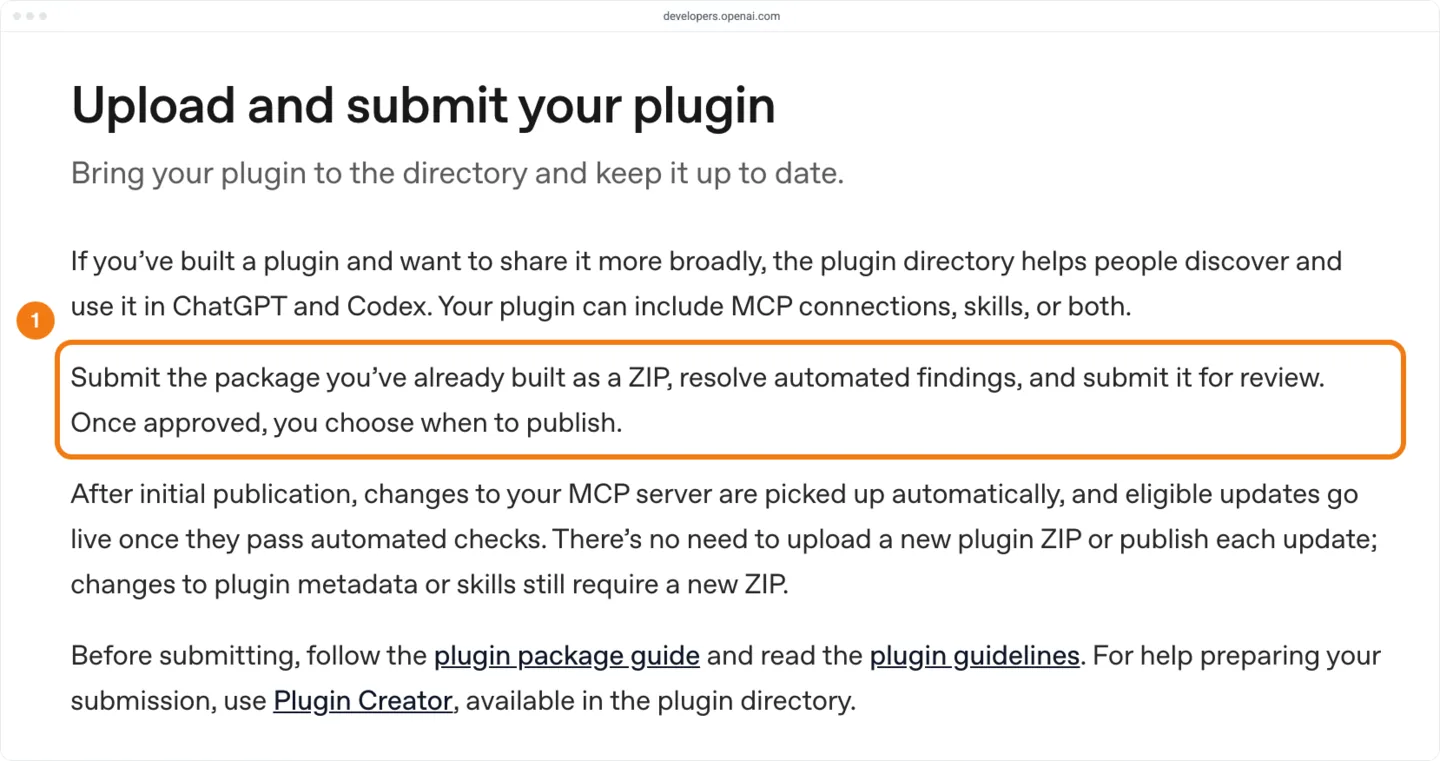
- Select Upload new or existing plugin.
- Choose your verified Developer identity.
- Select Upload plugin and choose your ZIP. The guide calls this the With MCP path for a remote server; pick it if the portal asks. When the upload works, the plugin's page opens with a draft.
- Under Metadata & Skills, wait for the checks to finish and read the Issues list.
- Fix each issue in the package and upload it again with Upload plugin to fix issues. The portal doesn't let you edit package details in place.
- Wait for the required skill scans to pass, since you can't submit until they do. OpenAI says they can take up to 2 hours.
- Open MCPs, select the server and select Connect.
- Check MCP Server URL and Authentication. The panel shows what
mcp.jsondeclares; to change it, editmcp.jsonand select Upload new version. - If you use a registered OAuth client, register the callback URL with your OAuth provider and enter OAuth Client Secret in the Connect panel. Skip this step if your
mcp.jsonusesdcrorcimd. Never put the secret inmcp.json: the manifest rejectsclientSecret, and public submission rejects nonempty serverheaders. - Serve the domain challenge token the portal shows as plain text, the token only, at
/on the MCP hostname or an eligible parent domain. If another plugin already uses that challenge URL, use an allowed parent domain or a different hostname instead of replacing its token. The domain is verified when Verify Domain passes..well-known/ openai-apps-challenge - Select Connect again and authorize the account used for the scan.
- Wait for the tool scan. When it finishes, the discovered tools are listed under MCPs. OpenAI gives no duration for this scan.
- Open Issues and fix required setup and validation errors, such as
scan_requiredordomain_verification_required, then select Reconnect or Rescan. Those errors block submission; other findings can go to the review team. - Give a justification for each tool's
readOnlyHint,destructiveHintandopenWorldHint, and explain each external frame domain your UI loads. - Under Metadata & Skills, open Review information, then Review details. Check that the test cases, video URL, release notes and countries came in from the ZIP. Imported cases are read-only here; change them in the package and upload it again.
- Enter the reviewer credentials: the test account's login URL, any workspace or tenant details and the sign-in steps. Then select Save details, and keep the account and its sample data available for later reviews.
- Select the draft, choose Submit for review and complete the attestations. The plugin then shows under Review status.
- Check your email. OpenAI emails you on every status change, and the review team sends its decision and feedback by email. If you contact support, include the plugin ID shown on the portal's plugin page. Copy it from there rather than reusing the
plugin_asdk_appid from your ChatGPT test, since OpenAI doesn't say whether the two match. - Once approved, open the approved version and select Publish plugin. To confirm it is live, search the directory for its exact name or open its directory URL from the portal.
When an upload or the final submission fails, the Issues list names an error from the submission errors reference. Eight of them map to steps in this guide:
| Error | What it means | Fix |
|---|---|---|
app_configuration_excluded | The ZIP holds apps or .app.json | Build the ZIP from skills/ and assets/ only, as in the build steps |
plugin_runtime_surface_missing | The ZIP has no valid skill | Add the get-started skill |
skill_frontmatter_missing | SKILL.md doesn't start with YAML front matter | Add front matter with name and description |
scan_required | The production server has no current, successful scan | Connect the server under MCPs, then select Rescan |
domain_verification_required | The challenge token isn't served, or Verify Domain hasn't passed | Serve the token and verify again |
justification_required | A tool annotation has no justification | Write a reason for each hint on each tool |
screenshots_not_allowed | The ZIP has screenshots but the scan found no UI template | Remove the screenshots |
plugin_version_unchanged | An update reuses the published version | Raise version and upload again |
Where do OpenAI's pages disagree?
OpenAI's pages give different answers on five points. The last column is the choice that works under both readings:
| Question | One page says | Another says | What to do |
|---|---|---|---|
| How do you start a review? | Review page: add the MCP details, select Scan Tools, then fill in a form with the name, logo, description, test prompts and localization | Submission guide: upload a ZIP, connect the server under MCPs and use Rescan | Follow the submission guide; the review page's step list describes the old form |
| Which permission lets you submit? | Submission guide: owners, or members with the Apps Management Write role | Review page: the api.apps.write permission, which owners have automatically | Ask an owner for the Apps Management Write role; we have not found a page that says the two are the same |
| Do annotations need a justification? | Guidelines: no longer required | Submission errors: justification_required at final submission; the review page says justifications explain the values | Write a one-line reason for each hint on each tool. A justification never overrides the value your server advertises, so fix a wrong annotation and rescan |
| Does an MCP plugin need a skill? | Submission guide: a plugin can include MCP connections, skills or both | Submission errors: a public ZIP must contain at least one valid skill (plugin_runtime_surface_missing) | Include the get-started skill |
| Are screenshots used? | Guidelines: screenshots are no longer shown in the directory | Submission errors and the review page: allowed when the plugin has UI | Write starter prompts; add screenshots only if your plugin has UI |
Which countries will list your plugin?
publication.countries in the manifest sets where the plugin is listed, and it applies when the plugin is published. [] removes country restrictions, and leaving the field out keeps the countries a published plugin already has. OpenAI's submission guide doesn't say which countries a new plugin gets when the field is left out. Countries set in the manifest are imported into Review details, so check them there before you submit.
- To be listed everywhere, put
"countries": []underextensions["com.openai"].publication, and don't leave the field out. - Set a list of uppercase codes, such as
["US", "GB"], only if legal or product limits require one. - After you publish, check your country availability.
- If the plugin shows gaps you didn't set, upload a new version with
[].
Few top-100 apps have country gaps, but the gaps are wide. Among the 1,202 apps in a US top 100, counting Popular and the other collections, 70 are missing from at least one of the 48 countries with data, and 32 are listed only in the US. The median app with gaps is listed in 2 countries.
| Category | Apps in US top 100 | In all 48 countries | US only |
|---|---|---|---|
| Healthcare | 100 | 87 | 11 |
| Finance | 100 | 89 | 7 |
| Communication | 97 | 89 | 3 |
| Other | 100 | 91 | 3 |
| Creativity | 100 | 93 | 1 |
| Travel | 100 | 93 | 1 |
| Scientific Research | 34 | 32 | 1 |
| Business & Operations | 100 | 95 | 0 |
| Data & Analytics | 100 | 96 | 3 |
| Education | 100 | 98 | 1 |
| Security | 66 | 65 | 1 |
| Developer Tools | 100 | 99 | 0 |
| Productivity | 100 | 100 | 0 |
Why country availability matters has the country-by-country numbers for Oct 13, 2026, from 1,136 apps in 42 countries with data. The count of apps with gaps (70) and of US-only apps (32) is the same on Oct 25.
How long does ChatGPT app review take?
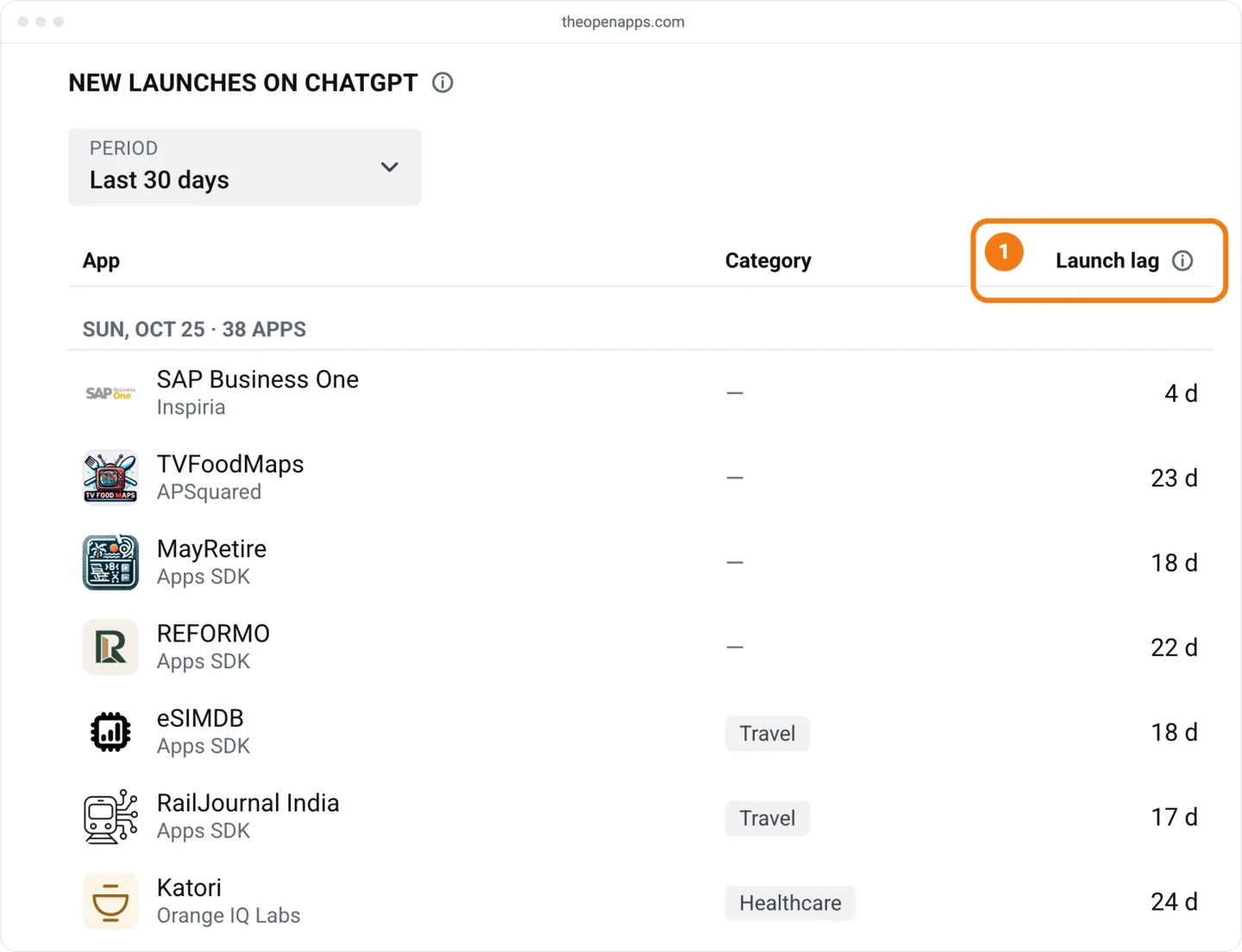
OpenAI publishes no review time. Its review page says timelines vary and asks developers not to contact support to speed a review up. The nearest measure is the launch lag, the days from the creation of an app's id to the day it went live. On Oct 25, 2026, the 2,758 Apps SDK apps that went live Oct 11 to Oct 24 had a median lag of 14.9 days, and the middle half took 9.8 to 16.7 days. That total covers building, the scans, review and your own Publish click, and we can't separate the parts.
Our launch lag report and the launch checklist, both from Oct 13, give a 32.5-day median from 19 apps that went live Oct 7 to Oct 13. With Oct 25, 2026 data, that week holds 456 Apps SDK apps that went live outside the Oct 8–9 batch, with a median of 19.0 days.
Developers in one OpenAI Developer Community thread on review times reported waits from 8 days for an update to more than 3 months, in posts from Jun 8 to Aug 6, 2026. These are single reports.
OpenAI's package guide shows a plugin_asdk_app id appearing when you first add your server in ChatGPT and select Create as a plugin. It doesn't say whether the published plugin keeps that id. If it does, your launch lag starts on your first test day, not on the day you submit.
| Days from creation | Apps |
|---|---|
| 0 to 6 | 565 |
| 7 to 13 | 396 |
| 14 to 20 | 1,459 |
| 21 to 29 | 151 |
| 30 to 59 | 127 |
| 60 to 89 | 27 |
| 90 or more | 33 |
The lag clusters tightly: days 14 and 15 alone hold 919 apps (33%). At the fast end, 565 apps (20%) took under 7 days, and 97 of those came from one publisher, so the fast group isn't typical. Every category's median falls between 14.2 and 15.4 days, so Finance and Healthcare (both 15.1) don't take longer at the median. Healthcare has a longer tail on a small sample: 7 of its 56 apps (13%) took 30 days or more, against 187 of all 2,758 (7%).
Announce on the day the app appears in the directory. For a press release, the review page asks you to contact press@openai.com first.
Go-lives rose from 1,118 in the week to Oct 17 to 1,640 in the week to Oct 24. New launches lists each day's go-lives with each app's lag, so you can look for yours there.
Why do ChatGPT apps get rejected?
OpenAI's review page lists the most common rejection reasons: the reviewer can't connect or sign in, test cases don't give the expected result, tools return user data the privacy policy doesn't disclose, and annotations don't match what a tool does. The rest of the table comes from the guidelines and the submission errors reference. OpenAI publishes no rejection counts, and a rejected plugin never reaches the directory, so our data can't rank the reasons.
| Reason | What the store's pages say | Fix |
|---|---|---|
| Reviewer can't connect or sign in | Review page: the URL or credentials fail, need MFA, work only inside a company network or have expired. Guidelines: a new sign-up or 2FA the reviewer can't reach is rejected | Test the login from outside your network on the day you submit |
| Test cases fail | Review page: each case must give the expected result, with no UI errors, on the ChatGPT and Codex surfaces where the plugin is available | Rerun them as the test account (see the callout below) |
| Tool returns user data the privacy policy doesn't list | Review page: disclose the user-related data your tools return, and strip internal ids, session, trace or request ids and timestamps | Trim the response fields, or disclose the ones you need |
| Annotations don't match behaviour | Review page and guidelines: readOnlyHint, destructiveHint and openWorldHint set explicitly and accurately | Fix the annotation on the server and rescan |
| Frame domains unexplained | Submission errors: each external frame domain needs an explanation. Guidelines: iframes can mean slower approval or rejection | Explain each domain; drop any the UI doesn't need |
| Tool definitions unclear | Guidelines: a plugin "may be rejected" when a tool's description leaves its behaviour unclear or incomplete. Each operation needs its own tool, and no generic executor may run operations not exposed for review | Split the operations into separate tools and rewrite each description |
| Inputs or text overreach | Guidelines: no input fields for the full conversation history or precise location, and no model-readable text that steers the model toward or away from other plugins | Trim the input schemas and descriptions |
| Fails on mobile | Guidelines: plugins must work in ChatGPT on desktop and mobile, UI included | Check each UI at 375 pixels wide, in light and dark theme |
| Unofficial connector | Guidelines: plugins that mainly act as unofficial connectors to third-party services can't be approved | Wrap only services you own or are authorized to use |
| Publisher not verified | Review page: publishing under an unverified name is rejected. Submission guide: public URLs must identify the same publisher | Verify the identity you publish under and use URLs on its site |
| Name too generic | Guidelines: no generic dictionary words that aren't your brand; no "MCP" or "Plugin" added to the name | Use your product's own name |
| Demo or trial product | Guidelines: trial or demo plugins aren't accepted | Submit the stable, complete product |
| Duplicates a built-in feature | Guidelines: a plugin should offer functionality or workflows that ChatGPT doesn't support natively | Lead the description and the test cases with what only your service does |
| Restricted data or digital goods | Guidelines: no card data, protected health information (PHI), government ids or credentials. Commerce is for physical goods only, with checkout on your own domain | Remove the data or the feature. If the plugin sells physical goods, set review.commerce to true and describe what it sells in review.commerce_description |
| Prohibited goods or services | Guidelines: plugins can't sell or enable gambling, prescription or regulated drugs, weapons, tobacco and nicotine, adult products, or services such as executing money transfers, crypto transfers or investment trades, debt relief or credit repair | Check the guidelines' prohibited lists before you build; a plugin can't execute money transfers, crypto transfers or investment trades for the user |
| Upsell or checkout link | Guidelines: no subscription plans, upgrade prompts or links to a checkout or upgrade page anywhere in the plugin. It may say a feature needs another plan and link a page that describes the plans. No ChatGPT-specific fees, and no worse version of a feature than your own site or app offers | Replace upgrade buttons and checkout links with a plain note and, if you want, a link to that page |
| Pricing in the text | Guidelines: no pricing, subscriptions, trials, discounts or promotions in descriptions | Describe what the plugin does |
| Ads, OpenAI endorsement or adult content | Guidelines: no ads, nothing that implies OpenAI made or endorsed the plugin, and content suitable for users aged 13 to 17 | Remove the ads and any wording that suggests OpenAI's backing; keep the content suitable for ages 13 to 17 |
Developers in the OpenAI Developer Community's submission roundup report rejections for failed test cases, annotations that don't match what a tool does, and a developer name that doesn't match the verified one. In a thread titled ChatGPT apps reject with same feedback, the rejection asked for the same test cases to pass on ChatGPT web and mobile. One developer there was approved after fixing three things: a test case that returned no data, light and dark theme problems, and development links left in the widget's content security policy. These are single reports, not store rules.
After a rejection, read the feedback in the email and fix each point it names. Then either reply to the email to appeal, explaining why the decision should change and including the plugin ID shown in the portal, or upload a corrected ZIP and submit again. OpenAI's support team on the Developer Community has also asked for the exact test results.
What happens after approval?
Approval doesn't put the plugin live: you select Publish plugin, and then the store decides where it appears. The review page says people can find a published plugin by its direct link or by searching its name, and the directory's main pages show it only if OpenAI selects it. The guidelines say plugins with strong utility and high user satisfaction may be eligible for wider distribution, such as directory placement or proactive suggestions; the review page adds that few get it at publication and you can't request it.
Our data shows a little more than the review page promises. Of the 2,758 Apps SDK apps that went live Oct 11 to Oct 24, 2,544 were in a US category list on Oct 25, 2026, and none was in Popular, New & Noteworthy, Small Business or on a home shelf. In every list longer than 100 apps, none had reached the top 100; the best was #101 in Healthcare.
| Category | Apps in list | Went live Oct 11 to Oct 24 | Median position, % of the way down | Best position | In top 100 |
|---|---|---|---|---|---|
| Productivity | 2,130 | 736 | 80% | #843 | 0 |
| Business & Operations | 1,561 | 411 | 83% | #582 | 0 |
| Other | 1,025 | 239 | 86% | #182 | 0 |
| Developer Tools | 739 | 158 | 85% | #195 | 0 |
| Finance | 709 | 185 | 86% | #181 | 0 |
| Education | 611 | 189 | 78% | #357 | 0 |
| Travel | 568 | 147 | 86% | #406 | 0 |
| Creativity | 531 | 187 | 79% | #164 | 0 |
| Data & Analytics | 487 | 172 | 79% | #261 | 0 |
| Healthcare | 166 | 56 | 81% | #101 | 0 |
| Communication | 97 | 41 | 76% | #54 | 41 |
| Security | 66 | 17 | 86% | #48 | 17 |
| Scientific Research | 34 | 6 | 91% | #27 | 6 |
A new app starts near the bottom of its list. In Productivity, 736 of its 2,130 apps (35%) went live in those two weeks; in Communication it was 41 of 97 (42%). The data shows where new apps sit, not why.
The category you set in the manifest decides which list you join and how many apps you compete with. The list names match the manifest's category values, with three exceptions: Education & Research shows as Education, Scientific Research is not a manifest value, and data is not available for an Entertainment list, although Entertainment is a manifest value. Pick the category that fits what the plugin does. If two fit, the shorter list starts you nearer the top: the median recent app sits at #74 of 97 in Communication and at #1,300 of 1,561 in Business & Operations.
New & Noteworthy holds few new apps. On Oct 25, 2026, New & Noteworthy held 20 apps; the newest was created Sep 22, and only one had gone live since Oct 6. How to get on a ChatGPT home shelf covers the climb from a list to a shelf.
Updating a live plugin
The submission guide and the review page set these rules for changes:
| Change | New review? | How |
|---|---|---|
| Tools on your MCP server | Automated checks only | Deploy, then select Rescan under Issues, or wait for the daily scan. New tools stay off until approved, and a held change keeps the old approved definition live, so keep the server compatible with it. If a held change is wrongly flagged, select Appeal; automatic MCP updates pause while the appeal is open |
| Listing, assets or skills | Yes | Bump version, keep the same name and upload a complete ZIP with Upload plugin to make changes, then submit and publish the approved version. Only one review can be active per plugin, so cancel a pending review with Cancel Review before you upload a replacement. If you submitted through the older form, first download your release ZIP from the … menu |
| The MCP URL's path | Yes | Ship it as a new version (review page) |
| The MCP URL's origin (scheme, host or port) | Yes, as a new plugin | The review page says to create a new plugin; the submission guide says to contact support for any URL change |
What our data can't tell you
- We can't see submissions, approvals or rejections. A rejected app never appears, so we have no approval rate.
- Leave room for a long wait: 60 of 2,758 apps took 60 days or more, and the lag counts only apps that went live, so apps still waiting aren't in it (right-censoring).
- Data is not available for go-lives before Oct 6, 2026. The lag figures use the two full weeks Oct 11 to Oct 24, so they describe this month, not a season.
- The lag and list-position figures count only Apps SDK apps (id family
plugin_asdk_app_). They leave out the 208plugins_-family listings that went live Oct 11 to Oct 24; their median lag was 14.0 days. OpenAI doesn't say which family a new ZIP submission gets. The two medians are within a day of each other, so the family doesn't change the estimate. - We see that an app is missing in a country, not whether the developer or the store chose that. The same holds for the 214 recent apps (8%) that were in no US category list on Oct 25.
On the day you submit, sign in as the test account and run all 8 cases on the build you're submitting. Run them through your custom MCP server in Work on ChatGPT web and through the packaged test copy in Work mode and Codex in the ChatGPT desktop app, in light and dark theme, and check each UI at 375 pixels wide. OpenAI documents no way to test on mobile, so a mobile failure may first show up in review. Fix any case that fails before you submit.